 PH
PH
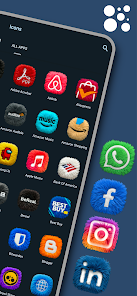
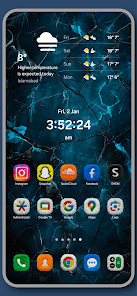
App Overview: Fluffy Icons - One UI Style
Fluffy Icons is a premium icon pack featuring high-quality 3D fur textures inspired by the One UI aesthetic. It utilizes ultra-HD detailing to provide a realistic plush effect, moving beyond standard flat design trends.Technical Specifications
| Feature | Details |
|---|---|
| Version | v12.7 [Patched] |
| Android Requirement | 5.0 and up |
| Icon Count | 1000+ Hand-Crafted 3D Icons |
| Widgets | 15 included (Requires KWGT Pro) |
| Status | Premium / Patched / Debug Codes Removed |
Key Features
- 3D Fur Texture: High-definition plush detailing and realistic depth.
- Neon Color Palette: Optimized for both light and dark mode visibility.
- Premium Icon Requests: Support for missing apps with a 24-48 hour turnaround.
- Weekly Updates: Ongoing additions to the icon library.
- Integrated Dashboard: Interface for applying icons and managing requests.
Widget Collection
The pack includes a set of 15 KWGT-based widgets to complement the icon set:- Weather: 2 Dynamic 3D fur-textured widgets.
- Daily Brief: 1 Smart greeting widget (Morning/Evening).
- Capsules: 8 Pill-shaped shortcuts.
- Fluffy Buddies: 4 Character-based app shortcuts.
Compatibility
The pack supports over 30 launchers, including:- Samsung One UI Home
- Nova Launcher
- Lawnchair
- Niagara Launcher
- Smart Launcher
- Action Launcher
Installation Guide
- Icons: Install the application, open the dashboard, select "Apply," and choose the active launcher.
- Widgets: Long-press the home screen, select "Widgets," choose "KWGT," and load the Fluffy Icons preset.