 PH
PH

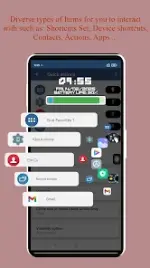
App Overview: Swiftly Switch Pro
Swiftly Switch is an edge-based utility designed for Android 6.0+ to facilitate one-handed usability and rapid multitasking. The application operates in the background, accessible via a swipe from the screen edge.Technical Specifications
| Category | Details |
|---|---|
| Version | v4.5.1+ build 200 |
| Android Requirement | 6.0 and up |
| License Type | Pro / ρáíd (Mod) |
| Modifications | Premium unlocked; Unwanted permissions/receivers/providers/services removed; Debug code stripped. |
Core Functionality
- Recent Apps Switcher: Displays recent applications in a floating circle sidebar accessed via the edge trigger zone.
- Quick Actions: Deep-swipe gestures to trigger system actions such as pulling down notifications, switching to the last app, or navigating back.
- Grid Favorites: A customizable side panel for shortcuts, quick settings, and contacts.
- Circle Favorites: A dedicated circular interface for user-defined shortcuts.
Supported Shortcuts
The application supports a wide range of system and app-level shortcuts, including:- System Toggles: Wi-Fi, Bluetooth, Auto-rotation, Flashlight, Brightness, Volume, Ringer mode.
- Navigation: Home, Back, Recent, Last App, Power Menu, Pull down notification.
- Communication: Contacts, Dial, Call logs.
Customization Options
| Feature | Customization Parameters |
|---|---|
| Interface Layout | Circle pie control, sidebar, or floating side panel. |
| Trigger Zone | Adjustable position and sensitivity of the edge screen trigger. |
| Visuals & Feedback | Icon size, animation styles, background colors, and haptic feedback. |
| Per-Edge Settings | Independent content and behavior configurations for each screen edge. |
Pro Version Features
- Dual Edge Support: Unlocks the use of a second edge trigger.
- Grid Scaling: Ability to customize the number of columns and rows in the Grid Favorites section.
- Shortcut Pinning: Option to pin specific favorite shortcuts within the Recent Apps view.
- Smart Visibility: "Auto disable" functionality when full-screen applications are active.