 PH
PH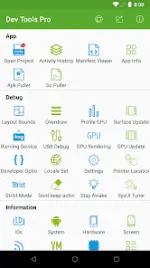
Android Dev Tools Pro v9.3.0-gp (Build 9300)
Android Dev Tools Pro is a productivity and automation suite designed for Android developers. It facilitates app decompilation, layout inspection, system monitoring, and streamlined access to developer settings.Technical Specifications
| Category | Details |
|---|---|
| Version | 9.3.0-gp (Build 9300) |
| Android Requirement | 5.0+ (Supports up to Android 12) |
| Architectures | arm64-v8a, armeabi-v7a |
| Status | Untouched ρáíd APK |
| Certificate MD5 | d40c55228e2ba2ee45f0f6f3d7f9ba8e |
Core Feature Set
- Decompilation & Manifest Viewer
- Decompile apps to view Java files and resources.
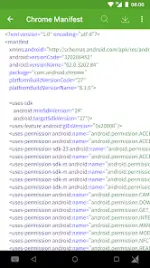
- View and search AndroidManifest.xml; export to SD card as text or HTML.
- Extract source APK or .so files from installed applications.
- Layout & UI Inspection
- Layout Inspector: View view ID, dimensions, parent/child hierarchies, and coordinates.
- Color Sampler: Eyedropper tool for screen coordinates and color values (ARGB/CMYK).
- Activity & App Management
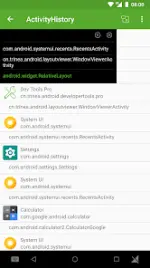
- Activity History: Track stack info (appName, packageName, start time) and current/top activities.
- App Info: View UID, APK/data directories, installation/upgrade timestamps, and component details.
- Automation & Developer Options
- One-click toggles for: Show screen layout, GPU overdraw, Layout updates, GPU rendering, Pointer position, Strict mode, Don't keep activities, and Stay awake.
- Uses AccessibilityService to automate navigation through system developer menus and retrieve class names for the Pro version.
- System Information
- Hardware specs, CPU details, VM info, network status, and Device ID.
- Quick links to System UI Tuner and language switching.
Integration & Shortcuts
- Desktop: Support for home screen widgets and long-press icon shortcuts.
- Android 7.0/7.1+: Integration with Quick Settings Tiles and App Shortcuts (launcher shortcuts).
- Small Window Mode: Support for viewing activity history in a floating window.
Recent Updates (v9.3.0)
- Decompilation now supports "Allow media scanning."
- Fixed layout view dragging issues.
- Optimized automation for opening developer options.
- Improved shortcut creation suggestions.
Open Source Tracking
Includes a daily curated feed of trending Android open-source projects to assist with development research.Main link: Download Mirror link1: Download