 PH
PH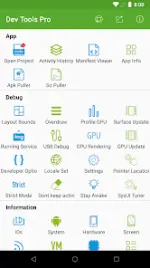
Android Dev Tools Pro v9.2.0-gp
Technical Specifications
| Attribute | Details |
|---|---|
| Version | 9.2.0-gp (Build 9200) [ρáíd/Premium] |
| Architecture | arm64-v8a, armeabi-v7a |
| Compatibility | Android 4.0+ (Ice Cream Sandwich through Android 12) |
| MD5 Digest | d40c55228e2ba2ee45f0f6f3d7f9ba8e |
| Signature | Original Hash Signature (Untouched) |
Core Features
- App Decompilation: View Java source files and resources; includes file sharing capabilities.
- Layout Inspector: View and export layout hierarchies. Provides View ID, width/height, parent/child view relations, and coordinates.
- Color Sampler: Eyedropper tool for capturing screen colors (ARGB/CMYK) and coordinates.
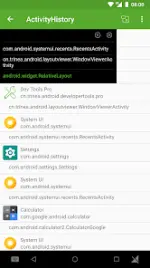
- Activity History: Logs AppName, PackageName, title, icon, and start time. Supports current/top activity tracking and small window mode.
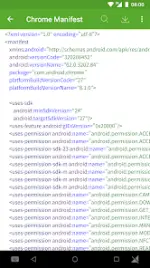
- Manifest Viewer: Searchable manifest viewer with export options (Text or HTML).
- App Management: Grid-based management for recently used or installed apps. Displays package name, version, UID, APK/SO/Data directories, and installation/upgrade timestamps.
- Resource Extraction: Extract source APK and .so files from installed applications.
- System Info: Comprehensive reporting on hardware, CPU, virtual machine, network, and Device ID.
- Open Source Projects: Daily curated feed of Android open-source projects.
Developer Options Automation
The tool provides one-click toggles for system-level developer settings, including:- Show screen layout and layout updates.
- Debug GPU overdraw and GPU rendering.
- Force GPU rendering and GPU view updates.
- Pointer position, strict mode, and "don't keep activities."
- Stay awake and Running Service access.
Integration and Shortcuts
- Desktop: Support for tool shortcuts (via long-press) and desktop widgets.
- System UI: Android 7.1 App Shortcuts (long-press icon) and Android 7.0 Quick Settings Tiles.
- Quick Access: Direct links to System Settings, System UI Tuner, Language Switching, and Developer Options.
Accessibility Service Implementation
This app utilizes AccessibilityService to perform the following automated tasks:- Toggle specific Developer Options automatically.
- Retrieve the ClassName of the current activity (Pro feature).
- Capture view information of the current page (Pro feature).
- Note: No user data is collected through this service.
What's New (v9.2.0)
- Optimized decompilation engine with "screen-on" support during processing.
- Refined layout and style architecture.
- Resolved snackbar styling issues.
- Added version support metadata to page footers.