 PH
PH
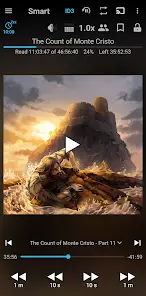

Smart AudioBook Player v11.7.3 (Build 301173)
Smart AudioBook Player is a dedicated application for local audiobook playback. The app focuses on independent progress tracking and specialized playback management for user-provided files.Application Specifications
| Attribute | Details |
|---|---|
| Version | 11.7.3 (Build 301173) |
| Status | Unlocked / Premium |
| Ad Policy | No Advertisements |
| Licensing | One-time purchase model (Standard) |
| Compatibility | Specialized builds available for Android 4.1 through current versions |
Core Functionality
- Folder-Based Library: Requires books to be organized in separate subfolders within a designated root directory (e.g., "My Audiobooks").
- Independent Progress Tracking: Playback position is saved independently for every book in the library; multiple books can be in progress simultaneously.
- Playback Speed Control: Variable speed adjustment for narration.
- Library Organization: Categorization of titles into New, Started, and Finished.
- Sleep Timer: Features an "Automatic Pause" function with a shake-to-reset gesture.
- Playback History: Log of previous positions to recover from accidental skips.
- Character Lists: Manual creation of character logs for narrative tracking.
- Connectivity: Supports Chromecast and Android Auto.
- System Integration: Includes an application widget for home screen control and automatic cover art downloading.
Recent Updates
- Android Auto Integration: New setting to automatically disable the sleep timer when connected to Android Auto (enabled by default).
- History Enhancements: Book position data now included in the History menu.
- UI Customization: Option to hide playback position format via Full Version settings.
- Audio Processing: Added Noise Reduction toggle within the Equalizer dialog (requires "App Decoder" to be enabled in Troubleshooting settings).
Technical Setup Instructions
- Place each audiobook in a unique subfolder inside the root folder.
- Navigate to Library → Settings → Root folder and select your audiobook directory.
- Perform a library Update to synchronize files.
- To enable Noise Reduction, ensure the decoder is set via Settings → Troubleshooting → Decoder → App Decoder.