 PH
PH

Application Overview
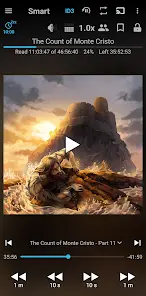
This is a dedicated local audiobook player designed to manage and play audiobooks stored directly on your device. It offers independent progress tracking for multiple books simultaneously and is completely ad-free.App Specifications
| Detail | Specification |
|---|---|
| App Name | Smart AudioBook Player |
| Current Version | v11.7.4 (Build 301174) |
| Status | Unlocked / Premium |
| Target Age Rating | 11+ |
| Legacy Compatibility | Dedicated versions available for Android 4.1-4.3 and Android 4.4-5.1 |
Technical Features
- Playback Speed Control: Adjust narration speed to accelerate or decelerate playback.
- Independent Progress Tracking: Save progress for multiple audiobooks concurrently without needing to finish one to start another.
- Classification System: Organize books into "New," "Started," and "Finished" categories.
- Automated Sleep Timer: Automatically pauses playback after inactivity. Features a shake-to-resume mechanism.
- Playback History: Keeps a log of previous positions to recover your place if a file skip occurs accidentally.
- Character Lists: Allows manual creation and tracking of character lists per book.
- Chromecast Support: Cast audio to external speakers or compatible devices.
- Cover Art Downloader: Retrieves book covers directly from the internet.
- Bookmarks: Create custom timestamps for notable sections.
- Home Screen Widget: Provides playback controls directly from the launcher.
Configuration and Setup
To ensure proper library parsing, file directory structures must be configured manually according to the following specifications:- Directory Structure: Create a root folder named
My Audiobookson your device storage. - Subfolder Isolation: Place every individual audiobook inside its own separate subfolder within the root directory (required even for single-file audiobooks).
- Library Pathing: Navigate to
Library->Settings->Root folderand select theMy Audiobooksdirectory. - Indexing: Press the Update button at the top of the Library window to compile the files.
Recent Changelog
Audio & Playback Options
- Added a Noise Reduction checkbox to the Equalizer dialog. Note: Requires "App Decoder" to be active under
Settings->Troubleshooting->Decoder. - Added a formatting option under
Settings->Full version settings->Playback position formatto select Don't show.
Integration & Navigation
- Added a dedicated setting under
Settings->Sleep timer-> Turn off in Android Auto. This disables the sleep timer automatically when connected to Android Auto (enabled by default). - Added the precise book position metric to the layout under
Menu->More->History.