PH
PHProfessor01
Elite
Stop YouTube Ads, Facebook Video Ads — gamit ang ControlD! 
Compatible sa Mac, Windows, Android, TV, at iOS, kaya kahit anong device mo, covered ka. Isang setup lang, goodbye sa istorbo na ads at hello sa mas smooth na streaming at browsing. 
Para saan nga ba ang ControlD?
Sagot:
Ang ControlD (Resolver ID) ay hindi lang basta DNS—ito ang smart tool para sa Android, TV, at iOS na kayang magtanggal ng ads (oo, pati sa YouTube  ) habang pinapalakas ang privacy mo. Isang setup lang, mas malinis na viewing at mas secure na browsing agad.
Bonus: Mas may control ka pa sa access at privacy mo online. 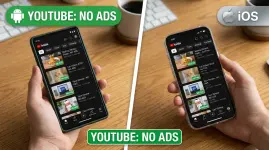
 CAUTION: ControlD can access logs, but it doesn’t matter to me what sites you visit—many people are already using it. If you’re worried about your browsing history, you can simply enable it when you want an ad-free experience and disable it afterward (for example, after watching YouTube or Facebook Reels). Using this DNS is entirely optional.
Sharing this as a way for you to enjoy YouTube and Facebook Reels without ads.
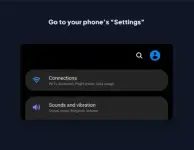
For Android users, follow these steps
STEP 1: Go to settings
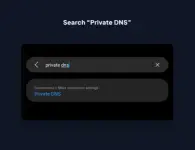
STEP 2: Search Private DNS
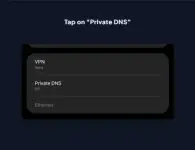
STEP 3: Tap on Private DNS
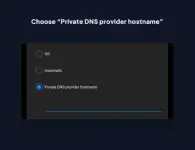
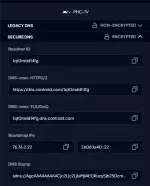
STEP 4: Copy and Paste this hurmnkjd4a.dns.controld.com
For iOS users, follow these steps
STEP 1: Go to Appstore Download Control D
STEP 2: Copy this 2gcrlcm6ns1 and paste it on the app
For Android TV users, follow these steps
STEP 1: Go to Wifi Settings copy and paste this DNS 1: 76.76.2.118 DNS 2: 76.76.10.118
Resolver ID: 1q0mdd14fg
For Window users, follow these steps
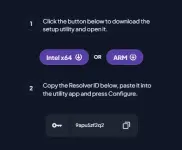
STEP 1: Download whether your pc is You do not have permission to view the full content of this post. Log in or register now. or You do not have permission to view the full content of this post. Log in or register now.
STEP 2: Install the software copy and paste this 9apu5zf2q2 then run it
For MAC users, follow these steps
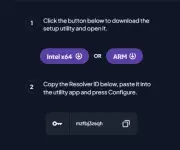
STEP 1: Download whether your MAC is You do not have permission to view the full content of this post. Log in or register now. or You do not have permission to view the full content of this post. Log in or register now.
STEP 2: Install the software copy and paste this mzfbj3zsqh then run it
Tadaaa
may YouTube, no ads kana!
Credit to: [B]Veraix[/B]