 PH
PH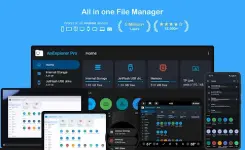
AnExplorer File Manager v6.0.1 (Pro)
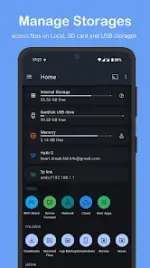
AnExplorer is a comprehensive file management solution designed with a Material You interface. It provides unified access to local storage, USB OTG, network shares, and cloud services across the entire Android ecosystem, including specialized support for Wear OS, Android TV, Android Auto, and XR/VR platforms.Technical Specifications
| Category | Details |
|---|---|
| Version | 6.0.1 (Build 60104) |
| Android Requirement | 6.0+ |
| Supported Architectures | Phone, Tablet, Foldable, Watch, TV, Car, VR/XR, Chromebook |
| File Systems | Full support for FAT32 and NTFS |
| Language Support | Full RTL (Right-to-Left) support |
Core Functionality
- File Organization: Standard operations (copy, move, rename, delete) with folder size display across all storage types. Supports hidden files and advanced search filtering by type, size, or date.
- Media Handling: Integrated photo viewer with metadata display, music player with background playback, and a video player supporting casting and streaming.
- Archive Management: View and extract ZIP, RAR, TAR, and 7z; create new ZIP archives.
- Document Tools: Built-in text editor (HTML, TXT) and a PDF viewer with search, zoom, and night mode.
- App Management: Installer for APK, APKM, APKS, and XAPK formats. Supports batch uninstalls and APK backups.
- Root Explorer: Advanced access to root partitions, including
/dataand/cachefor development purposes.
Connectivity & Network
| Feature | Description |
|---|---|
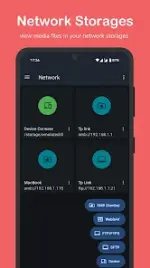
| Network Protocols | FTP, FTPS, SMB, and WebDAV support for NAS and shared folders. |
| Cloud Integration | Manage Box, Dropbox, OneDrive, Google Drive, Yandex Disk, PCloud, and Mega. |
| WiFi Share | Offline peer-to-peer file transfer between Android devices without a hotspot. |
| Device Connect | Built-in web server functionality to access files via a desktop browser. |
| Cast Support | Stream media directly to Chromecast, Google Home, and Android TV devices. |
Specialized Platform Support
- VR / XR: Optimized for Meta Quest, Pico, and HTC Vive; supports sideloading and APK installation.
- Wear OS: Manage watch storage directly from a connected phone; includes cloud storage support on the watch.
- Android TV: Full storage access for Google TV, NVIDIA Shield, and Sony Bravia with phone-to-TV transfer.
- Automotive: Compatible with Android Auto and AAOS for managing USB drives and sideloading files in-vehicle.
- Smart Glasses: Optimized for XREAL and Rokid to manage spatial videos and internal storage.
Version 6.0.1 Updates
- Enhanced Cloud: Expanded support to include Google Drive, Yandex Disk, PCloud, and Mega.
- Wear OS Improvements: Added cloud storage access directly on wearable devices.
- PDF Enhancements: Password-protected PDF support.
- APK Installer: New remote installation capabilities and improved format handling.
- Performance: General bug fixes and optimization.
 Key features | arm64-v8a download link:
Download
Key features | arm64-v8a download link:
Download