 PH
PH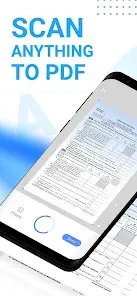

Mobile Scanner: All-in-One PDF & OCR Tool
Mobile Scanner is a high-performance scanning utility designed to convert physical documents, notes, and images into digital formats. The application utilizes advanced image processing and OCR technology to facilitate paperless workflows.Technical Specifications
| Category | Details |
|---|---|
| Version | v2.14.0 (Build 140) |
| Release Year | 2024 |
| Core Engine | Advanced Image Processing & OCR |
| Output Formats | PDF, JPEG, Word, TXT |
| Mod Status | Premium Unlocked, Debug code removed, Java .source attributes removed |
Core Functionality
Scanning & Optimization
- Precision Scanning: Capture receipts, business cards, contracts, and books.
- Batch Processing: Scan multiple pages and export as a single PDF.
- Smart Automation: Automatic border detection and edge cropping.
- Image Refinement: Tools for rotating, color adjustment, and resizing.
- Cleanup Tools: Remove stains, marks, creases, and handwriting.
- Advanced Filtering: Specialized filters for high-quality document generation.
OCR & Text Management
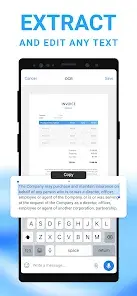
- Optical Character Recognition: Built-in technology to extract text from scans.
- Text Editing: Modify recognized text directly within the app.
- Export Options: Save extracted text as TXT or searchable PDF files.
Document Organization & Security
- File Management: Custom folder creation with drag-and-drop reordering.
- Cloud Integration: Native support for Dropbox, Google Drive, and OneDrive.
- Security: Password protection for individual documents and folders.
- Direct Printing: Integrated printing for invoices and contracts.
- Digital Signatures: Support for manual and saved signatures.
Version 2.14.0 Premium Features
- Full access to advanced image processing filters.
- Unlocked premium features and ρáíd tools.
- Optimized codebase with debug and source attributes removed for improved performance.