 PH
PH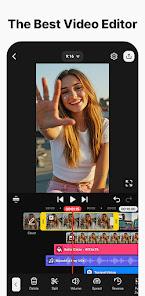


Kínémás†ér - Video Editor v8.1.8.36478.GP [Premium]
Kínémás†ér is a professional-grade video editing application supporting multi-layer video, images, and audio. It features a suite of AI-driven tools, keyframe animation, and high-resolution output capabilities for mobile platforms.Technical Specifications
| Detail | Specification |
|---|---|
| Version | v8.1.8.36478.GP (Build 36478) |
| Android OS | 8.0+ |
| Architecture | arm7 + arm64 |
| File Size | 129.2 MB |
| SHA-256 | 476760f0b18c60a092a820d5dc7e47102bcee8ac9f836c4dd66dc1f0edc029d0 |
| Format | APK |
Core AI Features
- AI Auto Captions: Instant subtitle generation from video/audio sources.
- AI Text-to-Speech: Converts text input into spoken audio.
- AI Voice & Music Match: Audio customization and automated song recommendations.
- AI Magic Removal: Background removal for subjects and faces.
- AI Noise Removal & Vocal Separator: Audio cleanup and isolation of vocals from music.
- AI Tracking & Upscaling: Element tracking for moving objects and low-resolution media enhancement.
- AI Style: Visual style transfer for video and image assets.
Advanced Editing Tools
- Keyframe Animation: Precise control over size, position, and rotation per layer.
- Chroma Key: Green screen compositing for background replacement.
- Speed Control: Support for reverse playback, slow motion, and time-lapse.
- Project Management: KineCloud backup for cross-device editing and template sharing (Mix).
- Interface: Supports both portrait and landscape editing with magnetic guides and full-screen previews.
Asset Library & Output
- Asset Store: Includes VFX, transitions, stickers, clip graphics, and professional fonts.
- Stock Media: Integrated green screen effects, stock footage, and color filters.
- Output Profiles: Supports 4K resolution at 60 FPS and transparent background video export for compositing.
Version History & Updates
- What's New: * Complete Text UI overhaul: Direct on-screen input, styling, and formatting.
- New word-by-word text animation.
- Legacy Note: Users updating from versions prior to v8.0.7.35886.GP require a clean installation. Project backup is recommended.
Technical Notes
- Premium Access: Functions in offline mode.
- Data Management: Utilizes built-in DocumentsProvider for application data access.
- Compatibility: Hook functions may vary by device hardware.
- Advertisements: Contains credit-based advertisements.