 PH
PH
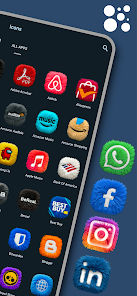
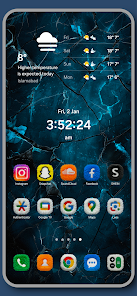
Fluffy Icons - One UI Style v12.4 [Patched]
Fluffy Icons provides a premium 3D fur texture aesthetic inspired by the One UI icon shape. These icons feature high-definition realistic detailing and are optimized for both light and dark mode environments.Technical Specifications
| Category | Details |
|---|---|
| Version | v12.4 [Patched] |
| Android Requirement | 5.0 and up |
| Icon Count | 1000+ Hand-crafted 3D icons |
| Texture Type | Real 3D Fur / Ultra HD Details |
| Mod Status | ρáíd/Patched, Premium unlocked, Debug codes removed |
Widget Collection (KWGT)
Note: Requires KWGT Pro for implementation.| Widget Type | Quantity | Features |
|---|---|---|
| Weather | 2 | Dynamic 3D fur textures |
| Daily Brief | 1 | Contextual morning/evening greetings |
| Capsule Widgets | 8 | Soft pill-shaped shortcuts |
| Fluffy Buddies | 4 | 3D character-based app shortcuts |
Compatibility & Launcher Support
The pack supports over 30 launchers, including:- Samsung One UI Home
- Nova Launcher
- Lawnchair
- Niagara Launcher
- Smart Launcher
- Action Launcher
Features & Functionality
- Premium Requests: Missing icons can be requested via the dashboard with a 24-48 hour turnaround.
- Weekly Updates: Continuous addition of new icons to the library.
- Vibrant Palette: High-contrast neon colors designed for Dark Mode compatibility.
- Dashboard: Built-in interface for icon application and request management.
Installation Instructions
- Install the Fluffy Icons application.
- Access the dashboard and select Apply.
- Choose the active system launcher.
- For Widgets: Long-press home screen > Widgets > KWGT > Select from the Fluffy Icons library.