PH
PHpapatalok00
Enthusiast
My purpose for this is only to use the PLDT HG8145X6-10 to become a secondary router but I included below how to change the router to EPON and XG-PON.
I previously flashed the router firmware so I don't know if this guide will work. Let me know if this works for you. If not, I will share the firmware I used here.
Don't include the quotation mark if I say type or input. Just type the characters inside the quotation mark.
1. Plugin the LAN cable in LAN1 in the router to your PC. Don't plugin the LAN from your ISP router yet. No need to configure the network configuration in your PC. Tested in Windows 11.
2. Open any browser and type in the URL "You do not have permission to view the full content of this post. Log in or register now." to access the webGUI for admin
3. Login using "adminpldt" as the username and "1234567890" or "AC2DIU7QW3ERTY6UPAS4DFG" as the default password
4. Setup the password when prompted
5. Login again as adminpldt using the new password you applied
6. Go to Security - Device Access Control
7. Enable the LAN-side PC to access the device using SSH and click apply
8. Download PuTTY
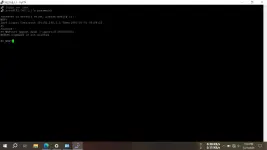
9. Type "192.168.1.1" let the port as is (Port 22) then click Open
10. Type "root" in the terminal (you cant use backspace here so just press enter when you mistakenly input wrong characters) then press enter
11. 1. Type "adminHW" without the quotation marks in the password (its natural that you will not see your input here) then press enter
12. Type "su" without the quotation marks then press enter
13. Type "set upport mode 3 upportid 0x00000001" without the quotation mark then press enter.
mode 6 I cannot access the webGUI with this mode
mode 5 means XG-PON
mode 4 means GPON/EPON
mode 3 means Ethernet (LAN can be used as WAN instead of the optic fiber port)
mode 2 means EPON
mode 1 means GPON
The number 1 on 0x00000001 means the lan port. If you input 1 it will be LAN1 in the router. You can put any number from 1 to 4 if you want. I didn't mess up with this so I will just have to use the number 1 for the sake of this guide.
14. Type "reset" without the quotation mark then press enter to restart the router
15. 4. After restarting move the LAN cable from LAN1 to LAN2
16. Go to You do not have permission to view the full content of this post. Log in or register now. and login using adminpldt
17. Go to WAN - WAN Configuration
18. Remove or delete all existing
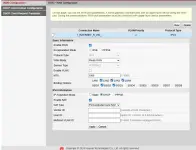
19. Click New and follow this configuration
Enable WAN: Enable/Check
Encapsulation Mode: IPoE
Protocol Type: IPv4
WAN Mode: Route WAN
Service Type: INTERNET
Enable VLAN: Disable/Uncheck
MTU: 1500
Binding Options: Check LAN2, LAN3, LAN4, SSID1, and SSID 5
For IPv4 Information dont change anything
Then click Apply
19. Plugin your the LAN cable that's connected to the ISP or main router to LAN1
20. Go to Security - Device Access Control then disable Enable the LAN-side PC to access the device using SSH then click apply
21. Go to System Tools - TR-069 then follow this configuration
Enable ACS Management: Disabled/Uncheck
Enable Periodic Informing: Disabled/Uncheck
ACS URL: Put anything. I input "asd" on this
ACS User Name: remove and keep empty
ACS Password: remove and keep empty
Connection Request User Name: remove and keep empty
Connection Request Password: remove and keep empty
DSCP: 0 or do not change
Click Apply
After clicking apply, the ACS Password and Connection Request Password will repopulate. Ignore these field and move on.
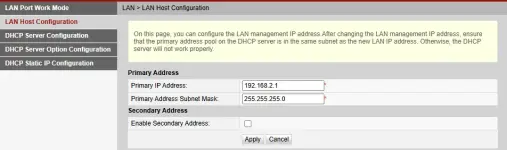
If the PLDT router IP address conflicts with your ISP router, just go to LAN - LAN Host Configuration and change the Primary Address to other segment. For example if the current primary address is 192.168.1.1 change it to 192.168.2.1 or other segment. I prefer using 192.168.2.1 and disable the secondary address.

I previously flashed the router firmware so I don't know if this guide will work. Let me know if this works for you. If not, I will share the firmware I used here.
Don't include the quotation mark if I say type or input. Just type the characters inside the quotation mark.
1. Plugin the LAN cable in LAN1 in the router to your PC. Don't plugin the LAN from your ISP router yet. No need to configure the network configuration in your PC. Tested in Windows 11.
2. Open any browser and type in the URL "You do not have permission to view the full content of this post. Log in or register now." to access the webGUI for admin
3. Login using "adminpldt" as the username and "1234567890" or "AC2DIU7QW3ERTY6UPAS4DFG" as the default password
4. Setup the password when prompted
5. Login again as adminpldt using the new password you applied
6. Go to Security - Device Access Control
7. Enable the LAN-side PC to access the device using SSH and click apply
8. Download PuTTY
9. Type "192.168.1.1" let the port as is (Port 22) then click Open
10. Type "root" in the terminal (you cant use backspace here so just press enter when you mistakenly input wrong characters) then press enter
11. 1. Type "adminHW" without the quotation marks in the password (its natural that you will not see your input here) then press enter
12. Type "su" without the quotation marks then press enter
13. Type "set upport mode 3 upportid 0x00000001" without the quotation mark then press enter.
mode 6 I cannot access the webGUI with this mode
mode 5 means XG-PON
mode 4 means GPON/EPON
mode 3 means Ethernet (LAN can be used as WAN instead of the optic fiber port)
mode 2 means EPON
mode 1 means GPON
The number 1 on 0x00000001 means the lan port. If you input 1 it will be LAN1 in the router. You can put any number from 1 to 4 if you want. I didn't mess up with this so I will just have to use the number 1 for the sake of this guide.
14. Type "reset" without the quotation mark then press enter to restart the router
15. 4. After restarting move the LAN cable from LAN1 to LAN2
16. Go to You do not have permission to view the full content of this post. Log in or register now. and login using adminpldt
17. Go to WAN - WAN Configuration
18. Remove or delete all existing
19. Click New and follow this configuration
Enable WAN: Enable/Check
Encapsulation Mode: IPoE
Protocol Type: IPv4
WAN Mode: Route WAN
Service Type: INTERNET
Enable VLAN: Disable/Uncheck
MTU: 1500
Binding Options: Check LAN2, LAN3, LAN4, SSID1, and SSID 5
For IPv4 Information dont change anything
Then click Apply
19. Plugin your the LAN cable that's connected to the ISP or main router to LAN1
20. Go to Security - Device Access Control then disable Enable the LAN-side PC to access the device using SSH then click apply
21. Go to System Tools - TR-069 then follow this configuration
Enable ACS Management: Disabled/Uncheck
Enable Periodic Informing: Disabled/Uncheck
ACS URL: Put anything. I input "asd" on this
ACS User Name: remove and keep empty
ACS Password: remove and keep empty
Connection Request User Name: remove and keep empty
Connection Request Password: remove and keep empty
DSCP: 0 or do not change
Click Apply
After clicking apply, the ACS Password and Connection Request Password will repopulate. Ignore these field and move on.
If the PLDT router IP address conflicts with your ISP router, just go to LAN - LAN Host Configuration and change the Primary Address to other segment. For example if the current primary address is 192.168.1.1 change it to 192.168.2.1 or other segment. I prefer using 192.168.2.1 and disable the secondary address.