 PH
PHAdobe Premiere Pro 2026 26.0.0.72 x64 [2026, MULTILANG + RUS] RePack m0nkrus

Year of release: 2026
Title: Adobe Premiere Pro
Version: 26.0.0.72
Developer: You do not have permission to view the full content of this post. Log in or register now.
Author of assembly: m0nkrus
Discharge: 64 bits
Interface language: English / Spanish / Italian / Chinese (simplified) / Korean / German / Portuguese / Russian / French / Japanese / English with support for Arabic / English with support for Hebrew / English (UK) / Spanish (Mexico) / French (Canada) / French (Marocco)
System requirements:
64-bit version of Microsoft Windows 10, Windows 11 (24H2 or later version)
Processor Intel 6-th generation or AMD Ryzen 1000 series with support for AVX2
(recommended Intel 11 processor-th generation / newer CPU with Quick Sync support or AMD Ryzen 3000 Series / Threadripper 2000 Series
8 GB RAM (recommended 16 GB for Mediad Data HD; 32 GB for Mediad Data 4K)
8 GB HDD free space on the hard disk; during installation, additional free space is required
Video card with 4 GB Video Memory (Recommended 8 GB)
Screen resolution 1920x1080 or above (recommended HDR 1000 for workflows using HDR)
Sound card with ASIO or Microsoft Windows Driver Model
Network card with 1 Gbbit / s for HD media exchange (recommended 10 Gbps for media exchange 4K)
Access to online services requires an Internet connection and registration
Additional system requirements:
You do not have permission to view the full content of this post. Log in or register now.
You do not have permission to view the full content of this post. Log in or register now.
You do not have permission to view the full content of this post. Log in or register now.
Description:
Editing a video that is always on the head above.
AdobePremiere Pro is a leading video editing software for film, television and the Internet.
Adobe Premiere Pro is a powerful, customizable editor for nonlinear mounting, with which you can mount the video exactly as you want.
Import and free combination of any video recordings, from the clip taken on the phone to the untreated 5K, followed by installation, for which it is not required to perform transcoding.
Perform video editing faster with Adobe Premiere Pro - the perfect toolkit for professional mounters.
Creative tools, integration with other Adobe applications and services, as well as the power of Adobe Sensei, help turn the footage into impeccable films and videos as part of a single workflow.
Now there are many new features available, including advanced support for original formats, improved function of installing material from several cameras, etc.
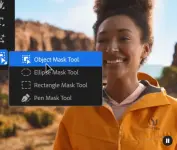
Screens:
Links:
You do not have permission to view the full content of this post. Log in or register now.
Ty lang sa comments ok na

Recommended use qbittorrent
Installation:
Installation of Adobe:
Run the file "Autoplay.exe".
Install the program/and Adobe.
OR
Open the "Setup" folder.
Start the "Setup.exe" file.
Block the Network Accession Program (outgoing connections).
-----------------------------------------------------------------------------
Adobe Installation:
Install the Adobe running "Autoplay.exe".
OR
Go into "Setup" (Pre-activated) folder and run "Setup.exe" as Admin.
Block the Application from Accessing the Network (outgoing)
Antivirus / Anti-virus:
Antivirus programs may mistakenly identify a drug or a treated file as a virus.
If you haven’t found any file in a downloaded handout, it was ate by your antivirus or Windows Defender.
Before unpacking the archive(s) and using a drug or a treated file, disable Antivirus and / or Windows Defender (Windows Defender) protection in real time.
In some cases, you need to add a file and/or folder and/or process to excluding the Windows Defender or your antivirus.
Instructions for Windows Defender (Defender Windows):
Windows Security - Protection against viruses and threats - Virus and other threats protection settings - Configuration management
- RETAIL protection in real time
- Exceptions - Adding or deleting exceptions - Add exceptions - Add a file/folder with dispensing.
Conduit - Computer protection - Real-time file system protection - Disable
Real-time file system protection - Six - Additional Settings - Exclusions for Processes - Add a file to the exceptions.
Configuring - System Scan - Six - Additional Settings - Exceptions from the Detection - Add folder with distribution files to exclusions.
Instructions for Kaspersky:
Six - Settings - General - Protection - Disable
Additional settings - Exclusions for processes - Add a file to exceptions.
Additional settings - Exceptions from detection - Add a file/folder with dispensing to the exception.
Instructions for AVAST:
Menu - Settings - Protection - Main components of protection - Responding.
Menu - Settings - General - Exceptions - We add folder with distribution files to exceptions.
Menu - Settings - General - Blocked and Authorized Applications - Allow an Application - Add a file to exceptions.
---------------------------------------------------------------------------------
 Anti-virus programs can prix error identification a medicine or a file as a virus.
If you'nt find a file in the downloaded distribution, it is, that it is tons of it.
Before unzipping archive(s) and using the medicine or the treatment file, disable the protection of the antivirus and/or Windows Defender in real time.
In some cases, you may need to add a file and/or folder and/or process to the Windows Defenders or your antivirus.
Here is the instructions:
Instructions for Windows Defender (Defender Windows):
Windows Security - Protect Against Viruses and Threats - Settings for Protection Against and Other Threats - Manage Incentives
- OFF Real-time Protection
- Exceptions - Adding or Exclus - Add an Exclus - Add a file / folderr with distribution to the exceptions.
Settings - Computer Protection - Real-time file system protection - disable
Real-time file system protection - Gear - Advanced settings - Process extensions - Add a file to the exceptions.
Settings - System Scanning - Gear - Advanced Settings - Add Folder with Distribution Files to Exclusions.
Instructions for Kaspersky:
Gear - Settings - General - Protection - Disable
Additional settings - Exceptions for processes - Add the file to the exceptions.
Additional settings - Exceptions from detection - Add the file / folderr with the distribution to the exceptions.
Instructions for AVAST:
Menu - Settings - Protection - Basic Protection Components - Disc.
Menu - Settings - General - Exceptions - Adding a folder with files to distributions.
Menu - Settings - General - Blocked and Allowed App - Add file to props.
ctto. m0nkrus