 PH
PHHello mga ka PHC! Were back at it again for another helpful tutorial! For this easy steps you'll be able to browse the blocked sites by your ISP.
Disclaimer: This tutorial is valid for Mobile (Android & IPhone) users only.
FOR PC/DESKTOP USERS


For Iphone users (wifi only):
Method 1:
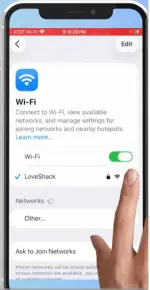
1. This only would work when you're connected to you're wifi, select your SSID name and tap on the ! button.
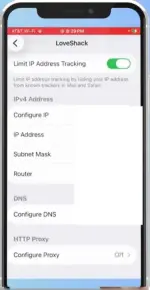
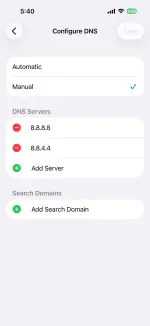
2. Scroll down to Configure DNS > Manual > then for Add server or gayahin niyo lang yung ginawa ko sa pic.
3. What to put? Choose between: 8.8.8.8 & 8.8.4.4 (google) & 1.1.1.1 & 1.0.0.1 (cloudflare).
4. Boom! Try to browse now smoothly.
Method 2:
Please refer to my post here:
Link: https://phcorner.org/threads/how-to-easily-bypass-blocked-websites-by-isp.2482102/
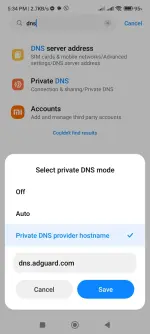
For android users :
Method 1:
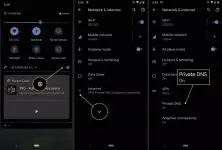
1. Just go to your device settings > search for dns > private dns > private dns provider hostname
2. Select between this three
dns.adguard.com (most advisable para iwas ads na rin)
dns.google (google dns)
one.one.one.one or 1dot1dot1dot1.cloudflare-dns.com (cloudflare dns)
3. Then save niyo lang. Boom you can now smoothly browse.
Method 2: (for wifi users ng android)
1. Please refer to this link also:
Link: https://phcorner.org/threads/how-to-easily-bypass-blocked-websites-by-isp.2482102/
ENJOY! HOPEFULLY THIS HELPS MGA KAPHC!
Disclaimer: This tutorial is valid for Mobile (Android & IPhone) users only.
FOR PC/DESKTOP USERS
For Iphone users (wifi only):
Method 1:
1. This only would work when you're connected to you're wifi, select your SSID name and tap on the ! button.
2. Scroll down to Configure DNS > Manual > then for Add server or gayahin niyo lang yung ginawa ko sa pic.
3. What to put? Choose between: 8.8.8.8 & 8.8.4.4 (google) & 1.1.1.1 & 1.0.0.1 (cloudflare).
4. Boom! Try to browse now smoothly.
Method 2:
Please refer to my post here:
Link: https://phcorner.org/threads/how-to-easily-bypass-blocked-websites-by-isp.2482102/
For android users :
Method 1:
1. Just go to your device settings > search for dns > private dns > private dns provider hostname
2. Select between this three
dns.adguard.com (most advisable para iwas ads na rin)
dns.google (google dns)
one.one.one.one or 1dot1dot1dot1.cloudflare-dns.com (cloudflare dns)
3. Then save niyo lang. Boom you can now smoothly browse.
Method 2: (for wifi users ng android)
1. Please refer to this link also:
Link: https://phcorner.org/threads/how-to-easily-bypass-blocked-websites-by-isp.2482102/
ENJOY! HOPEFULLY THIS HELPS MGA KAPHC!