 PH
PHPHC - KAZE
Forum Veteran
werman noise-suppression for voice (Krisp Ai Alternative)
Baka May naghahanap ng Cracked Krisp.Ai jan at di makahanap. Nagawan ko ng solution and Lifetime na to hehe.
Using Equalizer APO and Using werman noise-suppression VST file
Please download this Both before continuing in the Thread:
1. EqualizerAPO-x64-1.4.2 -> Download
2. win-rnnoise -> Download
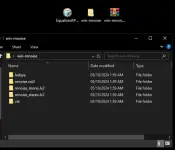
Note: Please unzip win-rnnoise.zip right away. Dapat meron kayo nitong Files Below
Installation and Configuration:
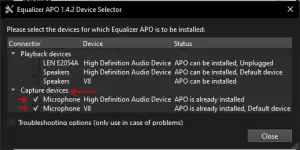
Step 1 install niyo muna yung Equalizer APO and After installation may lalabas na Interface for device Selector
tick or check niyo lang yung nasa Capture Device. Depende Syempre sa kung anong gamit niyo in my Situation ang gamit kong Capture device yung default sa laptop na mic and V8 soundcard with mic and click close.
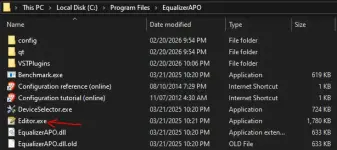
Step 2 locate the Editor.exe dito -> C:\Program Files\EqualizerAPO\Editor.exe or depende kung saan niyo i-ninstall yung Equalizer APO
Double click or open yung Editor.exe.
Click -> No
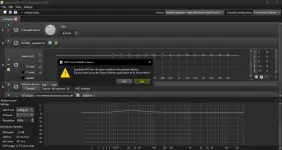
Step 3 Click the Green Plus Icon Left bottom Site
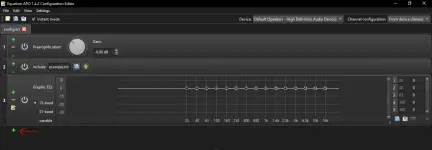
After Clicking the Green Plus Icon hover to Control -> Click Device(Select device)
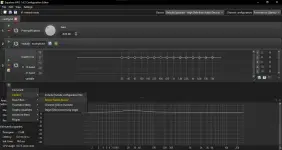
After Clicking the Device(Select device) Click -> Change -> Uncheck all devices -> Select your Capture device in my Case yung V8 Soundcard gusto ko lagyan ng noise suppression it depends on you and click OK.
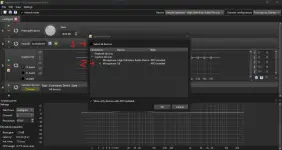
Step 4 Click Again the Green Plus Icon Below your Selected Capture Device -> Hover to Plugins -> Click to VST plugin
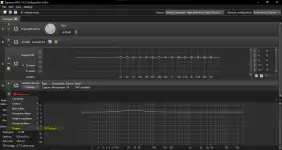
Last Step Import na natin yung VST File for Noise Suppression Click the Bluefolder Icon (File locator) locate -> win-rnnoise\vst\rnnoise_mono.dll (From Zip File)
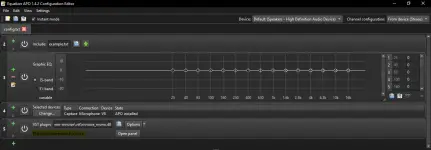
Viola! You're done Brother.
Note:
You can Disable the Noise Suppression by Clicking the Power Button Icon in VST plugin Tab.
or
You can Adjust the Noise Suppression on -> Open panel
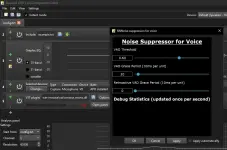
Use at your own risk I actually Using this for my Work btw IT Support ako and yung Client ko is from USA New York and It Works like Magic and ang Maganda for free.
Feed Back lang Guys Masaya nako!
Baka May naghahanap ng Cracked Krisp.Ai jan at di makahanap. Nagawan ko ng solution and Lifetime na to hehe.
Using Equalizer APO and Using werman noise-suppression VST file
Please download this Both before continuing in the Thread:
1. EqualizerAPO-x64-1.4.2 -> Download
2. win-rnnoise -> Download
Note: Please unzip win-rnnoise.zip right away. Dapat meron kayo nitong Files Below
Installation and Configuration:
Step 1 install niyo muna yung Equalizer APO and After installation may lalabas na Interface for device Selector
tick or check niyo lang yung nasa Capture Device. Depende Syempre sa kung anong gamit niyo in my Situation ang gamit kong Capture device yung default sa laptop na mic and V8 soundcard with mic and click close.
Step 2 locate the Editor.exe dito -> C:\Program Files\EqualizerAPO\Editor.exe or depende kung saan niyo i-ninstall yung Equalizer APO
Double click or open yung Editor.exe.
Click -> No
Step 3 Click the Green Plus Icon Left bottom Site
After Clicking the Green Plus Icon hover to Control -> Click Device(Select device)
After Clicking the Device(Select device) Click -> Change -> Uncheck all devices -> Select your Capture device in my Case yung V8 Soundcard gusto ko lagyan ng noise suppression it depends on you and click OK.
Step 4 Click Again the Green Plus Icon Below your Selected Capture Device -> Hover to Plugins -> Click to VST plugin
Last Step Import na natin yung VST File for Noise Suppression Click the Bluefolder Icon (File locator) locate -> win-rnnoise\vst\rnnoise_mono.dll (From Zip File)
Viola! You're done Brother.
Note:
You can Disable the Noise Suppression by Clicking the Power Button Icon in VST plugin Tab.
or
You can Adjust the Noise Suppression on -> Open panel
Use at your own risk I actually Using this for my Work btw IT Support ako and yung Client ko is from USA New York and It Works like Magic and ang Maganda for free.
Feed Back lang Guys Masaya nako!
