 PH
PH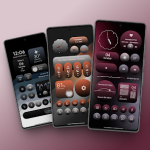
[Release] My Thing Adaptive KWGT v1.0.6 [Patched]
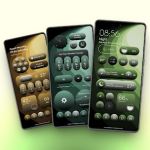
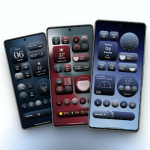
My Thing Adaptive KWGT is a premium widget expansion pack designed for Android 6.0 and higher. Centered around the futuristic Material You aesthetic, this pack allows for dynamic home screen customization where widgets automatically synchronize with your wallpaper's color palette.Please note that this is not a standalone application. It functions as a plugin and requires the KWGT Kustom Widget Maker along with the Pro Key for full functionality.
Technical Specifications
| Feature | Details |
| Android Version | 6.0 and higher |
| Required Tools | KWGT Maker & KWGT Pro Key |
| Total Widgets | 150+ High-Fidelity Templates |
| Design Language | Material 3 / NothingOS Inspired |
| Architecture | Universal |
| Interface | Dynamic / Adaptive Color Support |
Application Overview
The pack integrates seamlessly with modern custom launchers, such as Nova Launcher, to provide a cohesive UI experience. Users can maintain visual consistency through several built-in adjustment tools:- Manual Scaling: Adjust sizes via the "Scale" attribute in the KWGT Layer settings to fit any grid.
- Dynamic Extraction: Native Material You compatibility for automated color matching.
- Global Variables: Deep customization available within the primary editor for fine-tuning.
What’s New in v1.0.6
- Expanded Library: Added 15 new NothingOS-inspired widgets.
- Enhanced Styling: Introduced Material 3 E×ρréššive Style gradients.
- Total Count: Now features 150 premium adaptive widgets.
- Optimization: Improved loading times for global variables.
Modification Details
- License: Premium / Patched (No Lucky Patcher or Modded Play Store required).
- Optimization: All unnecessary files and debug codes have been removed for a smaller footprint.
- Compatibility: Supports Multi-Language and Universal CPU architectures.
- Stability: Original package signature changed for seamless patched installation.
Installation Instructions
- Place a KWGT Container on your home screen.
- Tap the container to open the My Thing Adaptive library.
- Select your preferred template.
- If the widget appears misaligned, navigate to the Layer tab in the KWGT editor and adjust the Scale percentage until it fits your layout.
Download