Sportv Portugal Channels MPD Need VPN

Firstly, thanks for your job, it's fantastic. Also for maxae as well.

Talking abour dazn portugal, a few months ago, it was possible to access channels using this parameters:

#EXTINF:-1 tvg-id="ELEVEN SPORTS 1.pt" group-title="Dazn PORTUGAL",DAZN 1 Portugal
#KODIPROP:inputstream.adaptive.license_type=clearkey
#KODIPROP:inputstream.adaptive.license_key=8ab47741930c476780515f9a00decb0a:7ab4b9ae5a48aa526e511a913b832769
You do not have permission to view the full content of this post. Log in or register now.

Right now, the mpd is not reachable and the kids are wrong. I don't know if this can help you to locate new mpd and kids. On the other hand, I think this kind of channel needs the right user agent too.

If you find anything, I would appreciate some help to find this sort of things by myself...even knowing that this kind of things are usually very hidden.
Your welcome, well, the kid it´s very easy for search only download the mpd, open Notepad++, program that i use, and find the word kid and you´ve an hexadecimal code, also, if you have Vineless it´s more easy because don´t need to think a lot for search a lot for kid.
About DAZN i don´t have idea, and sure it´s true that you comment, DAZN changes user-agent everything
Also in You do not have permission to view the full content of this post. Log in or register now. you can search the key
 
Thank you. I already knew and that's what I do. In fact, in other channels there is no problem, but in the case of Vodafone Portugal there is no way, quite the opposite of Vodafone Spain that they do see.
 
thanks very nice .
Do you happen to also have DAZN 1, 2, 3, 4, 5?
Code:
 DAZN 1 (PORT)
https://rr.cdn.vodafone.pt/LIVE/sdash/LIVE$521/index.mpd/Manifest.mpd?start=LIVE&end=END&device=DASH_AVC_FULLHD
39bcbc9418aa4d62b96b6a3eae2f6df0:a8f968b6a8ed7bfb17bf787b6c930c7e

DAZN 2 (PORT)
https://rr.cdn.vodafone.pt/LIVE/sdash/LIVE$522/index.mpd/Manifest.mpd?start=LIVE&end=END&device=DASH_AVC_FULLHD
3805cd533c1341a7934d13629eb7a34e:2542564928cb8e3fe4595ab8dcfd6e77

DAZN 3 (PORT)
https://rr.cdn.vodafone.pt/LIVE/sdash/LIVE$523/index.mpd/Manifest.mpd?start=LIVE&end=END&device=DASH_AVC_FULLHD
7224f2a6a14a4d88874d10dd953c88dc:9719ea238d3de66eb073ce842814f464

DAZN 4 (PORT)
https://rr.cdn.vodafone.pt/LIVE/sdash/LIVE$524/index.mpd/Manifest.mpd?start=LIVE&end=END&device=DASH_AVC_FULLHD
0b6e5fe5b1d140b092e22cc662088276:6bdd76adbc5bb25089983b2500dde7ca
 
Thank you. I already knew and that's what I do. In fact, in other channels there is no problem, but in the case of Vodafone Portugal there is no way, quite the opposite of Vodafone Spain that they do see.
Do you have info about Vodafone Spain channels? I can't find anything about them.

Thanks a lot, BTW.
 
Do you have info about Vodafone Spain channels? I can't find anything about them.

Thanks a lot, BTW.
Check this out. We have some channels, but not all, and there are many more.


Check this out. We have some channels, but not all, and there are many more.


Ok, it's fine to start. Thanks!!!
 
Code:
 DAZN 1 (PORT)
https://rr.cdn.vodafone.pt/LIVE/sdash/LIVE$521/index.mpd/Manifest.mpd?start=LIVE&end=END&device=DASH_AVC_FULLHD
39bcbc9418aa4d62b96b6a3eae2f6df0:a8f968b6a8ed7bfb17bf787b6c930c7e

DAZN 2 (PORT)
https://rr.cdn.vodafone.pt/LIVE/sdash/LIVE$522/index.mpd/Manifest.mpd?start=LIVE&end=END&device=DASH_AVC_FULLHD
3805cd533c1341a7934d13629eb7a34e:2542564928cb8e3fe4595ab8dcfd6e77

DAZN 3 (PORT)
https://rr.cdn.vodafone.pt/LIVE/sdash/LIVE$523/index.mpd/Manifest.mpd?start=LIVE&end=END&device=DASH_AVC_FULLHD
7224f2a6a14a4d88874d10dd953c88dc:9719ea238d3de66eb073ce842814f464

DAZN 4 (PORT)
https://rr.cdn.vodafone.pt/LIVE/sdash/LIVE$524/index.mpd/Manifest.mpd?start=LIVE&end=END&device=DASH_AVC_FULLHD
0b6e5fe5b1d140b092e22cc662088276:6bdd76adbc5bb25089983b2500dde7ca
Are you sure they work? I'm testing and I'm receiving error message: "Trust anchor for certification path not found". On the other hand, SPORT TV channels work perfect.

Do they need something special, like user-agent or other options?
 
I confirm they all work, I use this user agent= Mozilla/5.0 Windows NT 10.0 Win64 x64 AppleWebKit/537.36 KHTML, como Gecko Chrome/58.0.3029.110 Safari/537
 
I confirm they all work, I use this user agent= Mozilla/5.0 Windows NT 10.0 Win64 x64 AppleWebKit/537.36 KHTML, como Gecko Chrome/58.0.3029.110 Safari/537
What player are you using?

In my case, I tested on OTT Navigator.

Edit: working! I had to modify OTT config to disable SSL verifications.
 
What player are you using?

In my case, I tested on OTT Navigator.

Edit: working! I had to modify OTT config to disable SSL verifications.
It doesn't work on Tivimate. There's no option to disable SSL verification. If anyone knows how to do it, please let me know.
 
Are you sure they work? I'm testing and I'm receiving error message: "Trust anchor for certification path not found". On the other hand, SPORT TV channels work perfect.

Do they need something special, like user-agent or other options?
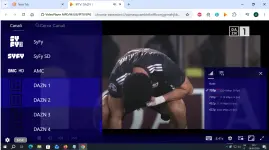
I added the four DAZN channels to the end of the list portugal.txt. I tested them with Chrome with the Sharkiller add-on installed, and they all work. Bye.

shar1.webp
 

Attachments

Hi, How did you modify OTT settings to disable SSL verifications? Thanks.
Settings/Extended configurations, then set "Expert mode" in "Dificulty" or "User Experience Level". After that, you'll have new options at the botton, select "System settings" and enable "Allow invalid SSL". Restart app and that's all.

I don't know if you have other names in options, depends on the OTT Nav release. For example, these are the steps given by author in his github:

Disable certificate validation within the app:
  • Settings -> difficulty -> expert
  • Settings -> extended -> system -> ignore invalid SSL
  • Restart the app
 

About this Thread

  • 58
    Replies
  • 1K
    Views
  • 16
    Participants
Last reply from:
k2000

Trending Topics

Online now

Members online
1,198
Guests online
1,917
Total visitors
3,115

Forum statistics

Threads
2,286,145
Posts
29,035,926
Members
1,217,806
Latest member
abihikari1
Back
Top