 PH
PH-
Welcome to PHCorner Forums! Sign up for free to unlock full access and exclusive privileges, including:
- Asking questions about computer and mobile issues
- Discovering internet tips for your mobile network and computer
You are using an out of date browser. It may not display this or other websites correctly.
You should upgrade or use an alternative browser.
You should upgrade or use an alternative browser.
Paano? Gumawa ng sariling Internet provider, At kumita
- Thread starter edmar25
- Start date

oligardajose
Elite
meron siyang router siguro mga 16 nakaconnect..tapos meron syang data cable kinakabit nya lang doon sa router lahat ng kliyente nya..siguro mga 50 to 80 mbps lang yan kaya mura 699
PHC_LaCe12
Forum Master
mikrotik lang yan yung hex
mikrotik lang yan yung hex
- good available bandwidth for you to share (ideally 1000 Mbps or greater)
- any router that allows you to setup a server (e.g. PPPoE, DHCP), and allows you to manage bandwidth allocation to each client
PHC_LaCe12
Forum Master
anong source ng net mo kuya?i would also suggest something more grunty than the hex, especially pag medyo dumami clients mo, and if you ever want to do something fancy, like monitoring their usage, etc. i'm running a CCR2004 with 2 clients i'm providing free internet service to.
- good available bandwidth for you to share (ideally 1000 Mbps or greater)
- any router that allows you to setup a server (e.g. PPPoE, DHCP), and allows you to manage bandwidth allocation to each client
bandwtich gngmjt sa compshop lalo na kong may internetcafe ka hahahai would also suggest something more grunty than the hex, especially pag medyo dumami clients mo, and if you ever want to do something fancy, like monitoring their usage, etc. i'm running a CCR2004 with 2 clients i'm providing free internet service to.
- good available bandwidth for you to share (ideally 1000 Mbps or greater)
- any router that allows you to setup a server (e.g. PPPoE, DHCP), and allows you to manage bandwidth allocation to each client
gigabit fibre - roughly 900/500. of that i give my 2 clients a max of 130/30 Mbps each, with a combined max of 200/50 Mbps. s'yempre isolated rin sila sa home network ko.anong source ng net mo kuya?
i'm based overseas and we're spoilt for choice when it comes to internet service. i have the option to upgrade to any of the following options, pero no need naman at the moment:
- 1000/1000
- 2000/2000
- 4000/4000
- 8000/8000
Anong main source mo ng pang internet bossi would also suggest something more grunty than the hex, especially pag medyo dumami clients mo, and if you ever want to do something fancy, like monitoring their usage, etc. i'm running a CCR2004 with 2 clients i'm providing free internet service to.
- good available bandwidth for you to share (ideally 1000 Mbps or greater)
- any router that allows you to setup a server (e.g. PPPoE, DHCP), and allows you to manage bandwidth allocation to each client
Anong main source mo ng pang internet boss
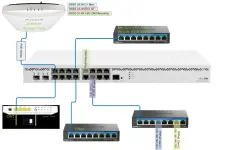
port 1 of the router (CCR2004) is connected directly to the ONT - PPPoE client to my provider. bunch of devices are connected to this including a couple of switches (office and entertainment centre), plus another switch to the port with a PPPoE Server for my clients - dalawa lang sila, but can easily expand/increase if required. at the moment, nadadagdagan lang ang client if i'm playing with another router.
a picture paints a thousand words, so the diagram is as shown below. for this thread, the main interest is the switch connected to port 11. that switch serves 2 purposes - (1) as a buffer between the clients and my main router in case something electrical goes wrong, and (2) easily allows my to connect other clients with only a single port on the router running the PPPoE Server.
i have some cleaning up to do - put a multigig switch to give 2.5Gbps to my access point, di kasi compatible 'yung SFP+ ports with 2.5Gbps, so i'll have to go [CCR2004]{10Gbps}[Switch]{2.5Gbps}{PoE injector}[WAP]. will likely also move the other devices to the switch.
Ang nakikita ko kasi, May sarili na silang box like other Unternet Provider PlDT/Converge and may sarili na rin silang pangalan at ang mga gamit nilang router para sa mga client na kumukuha sakanila ay mga na cut na router ng pldt mga ganun kaya pala daming bumibili ng mga router dito samin nung last year heheport 1 of the router (CCR2004) is connected directly to the ONT - PPPoE client to my provider. bunch of devices are connected to this including a couple of switches (office and entertainment centre), plus another switch to the port with a PPPoE Server for my clients - dalawa lang sila, but can easily expand/increase if required. at the moment, nadadagdagan lang ang client if i'm playing with another router.
a picture paints a thousand words, so the diagram is as shown below. for this thread, the main interest is the switch connected to port 11. that switch serves 2 purposes - (1) as a buffer between the clients and my main router in case something electrical goes wrong, and (2) easily allows my to connect other clients with only a single port on the router running the PPPoE Server.
i have some cleaning up to do - put a multigig switch to give 2.5Gbps to my access point, di kasi compatible 'yung SFP+ ports with 2.5Gbps, so i'll have to go [CCR2004]{10Gbps}[Switch]{2.5Gbps}{PoE injector}[WAP]. will likely also move the other devices to the switch.
View attachment 4027774
if you want to be a provider, that's potentially extra revenue. i haven't used an RSP-provided router for over a decade, and prefer having my own. this is one way to avoid getting stuck with dumbed-down firmware, that was made for the provider.Ang nakikita ko kasi, May sarili na silang box like other Unternet Provider PlDT/Converge and may sarili na rin silang pangalan at ang mga gamit nilang router para sa mga client na kumukuha sakanila ay mga na cut na router ng pldt mga ganun kaya pala daming bumibili ng mga router dito samin nung last year hehe
on the other hand, mas maraming potential customers who would expect to be provided with an AIO router. kung meron kang source, it would be easy to do so.
from your PPPoE server's point of view, it doesn't really matter what router is connected. currently, my 2 users have an HG659 (that i provided) and an eero6+.
Similar threads
About this Thread
-
11Replies
-
968Views
-
7Participants
Last reply from:
nitro7
nitro7
New Topics
-
IPTV PHILIPPINES CHANNELS
- Started by iptv-philippines
- Replies: 1
- 📡 Broadband, Modem, & Networking
-
Capcut 4x account Free open now
- Started by Emjayrtz
- Replies: 0
- 📡 Broadband, Modem, & Networking
-
ZTE MF903 Smart Openline baka meron kayo
- Started by PHCMaxx
- Replies: 0
- 📡 Broadband, Modem, & Networking
-
Globe modem Lan ports
- Started by johnkill
- Replies: 10
- 📡 Broadband, Modem, & Networking
-
Paano kumita by sharing internet?
- Started by JsCoder3
- Replies: 3
- 📡 Broadband, Modem, & Networking
-
Successful Openline PLDT 5G+ H153-381
- Started by TheManWhoCantBeMoved
- Replies: 18
- 📡 Broadband, Modem, & Networking
-
YOTC SURF TO SAWA 5G AND LAN
- Started by joerish29
- Replies: 0
- 📡 Broadband, Modem, & Networking
-
Best Firmware ni Globe rain 101
- Started by PH-CARL
- Replies: 6
- 📡 Broadband, Modem, & Networking
-
Dito wowfi(H151-370) sim
- Started by AVOITIX
- Replies: 0
- 📡 Broadband, Modem, & Networking
-
Help need stock firmware B535-932
- Started by AVOITIX
- Replies: 0
- 📡 Broadband, Modem, & Networking
Trending Topics
-
-
-
-
-
-
Rain101 (Anti TTL) Bypass Datamaxx 5GUnli / Sayall 5G Unli ( No Connection )
- Shuuuuuuuun
Replies: 73 -
-
-
-
Online now
- Members online
- 1,169
- Guests online
- 12,281
- Total visitors
- 13,450