 PH
PHbrendan666
Established
<speak>
<E×ρréšš-as type="shouting">Uy, uy!</E×ρréšš-as>
<break time="20ms"/>
<E×ρréšš-as type="fast">May dalawa sa mid.</E×ρréšš-as>
<break time="1200ms"/>
<E×ρréšš-as type="excited">Abangan niyo lang, baka mang-flank yung mga yun eh.</E×ρréšš-as>
<break time="20ms"/>
Check niyo yung gilid-gilid.
<break time="1360ms"/>
<E×ρréšš-as type="sad">Ay naku, talo na naman tayo.</E×ρréšš-as>
</speak>
Thank you for this, gamit ko right now yung V3 (alpha) ng elevenlabs, I was amazed talaga sa feature ng v3 here's an example nakita ko sa reddit.Di ko ma-perfect yung script! Test mo sa alam mong TTS engine like sa OpenAI' "alloy" medyo malapit ng kaunti pag kinalikot ng ilang beses.
I've been working so hard talaga to find ways to use TTS and configure it by adding some effects (like distortion) via python or similar app that can make an audio almost real.Obvious naman na AI yan sa tunog ng boses he he - TTS engine na may kaunting E×ρréššion training.
Maraming AI voice detector sa net to test, at ang average result is 82% AI.
Pag may oras ako bukas, replicate ko yan sa AI na ginamit!
Trial and error naman talaga pag nag-uumpisa he he. Di ako sure na OpenAI TTS ang ginamit dyan dahil, realistic yung E×ρréššions at high resolution audio (stereo) sa pandinig - baka Premium TTS like Chirp model (not Elevenlabs) ng Google. Baka pa nga pinaghalong human sa unahan at AI sa huli, tapos enhanced pagkatapos.I've been working so hard talaga to find ways to use TTS and configure it by adding some effects (like distortion) via python or similar app that can make an audio almost real.
I'll take a look yung OpenAI' "alloy" you have mentioned, salamat! If you have more idea, let me know hahaha.
To achieve your desired E×ρréššions and timing using OpenAI's native standards as of early 2026, use the following techniques:
1. Emotional E×ρréššion (Creative Wording & Punctuation)
OpenAI TTS does not use tags for "shouting" or "surprised". Instead, it reacts to punctuation and contextual cues:
2. Controlling Timing and Pauses
- Shouting: Use all caps and multiple exclamation points (e.g., "UY, UY!!!") to trigger a more energetic delivery.
- Surprise: Use interjections and question marks (e.g., "Hala! Abangan niyo lang...") to shift the pitch higher.
- Sadness/Disappointment: Use longer, slower sentences with periods to create a trailing, somber tone (e.g., "Ay naku... talo na naman tayo.").
Since<break>is ignored, you must use textual fillers or punctuation to simulate pauses:
3. Using the Realtime API (Instructions)
- Short Pauses (20ms - 500ms): Use commas (
,) or extra periods (.) between words.- Long Pauses (1s+): Use ellipses (
...) or dash marks (—). The model interprets an ellipsis as a natural break in thought.- Manual Segmentation: For exact 1.5s timing, it is standard practice to send separate API requests for each segment and stitch the audio files together with the desired silence in between.
If you are using the OpenAI Realtime API (introduced in 2025), you can influence the voice via the system prompt rather than tags:
Revised Example Script
- Instructions: "Speak like a gamer in a high-stakes match. Use a panicked tone when spotting enemies and a defeated, slow tone when losing."
- Result: The model will "steer" the voice based on these instructions while reading your text.
To get the best result without SSML, format your input like this:
Summary Comparison"UY, UY!!! ... May dalawa sa mid. ...... Hala! Abangan niyo lang, baka mang-flank yung mga yun eh. ... Check niyo yung gilid-gilid. ......... Ay naku... talo na naman tayo."
Pacing <break time="1s"/>Punctuation ( ...) or split API callsEmotion <E×ρréšš-as type="sad">Word choice and punctuation Volume <prosody volume="loud">Capitalization and exclamation marks Instruction Embedded in script Provided in System Prompt (Realtime API)
I think the elevenlabs pero v2 supports the XML thing or like yung parang may tags and attributes.May correction ako sa sinabi ko sa post#3 and #6. Kahit nag-convert ng audio yung OpenAI TTS using SSML doesn't mean it supports XML - di kasi supported yung SSML sa ngayon sa nabasa ko. Nataon lang na its system ignored the tags and processed only the plain text inside them. Maling akala he he. Kahit sa ElevenLabs version model specific pag gagamit ng phoneme tags. di pa masyadong established yung voice customization kahit outside SSML methods sa TTS/STT. Sa OpenAI, ito yung nakuha kong basic instructions:
I still end up using elevenlabs v3, talaga. here's a sample audio.May correction ako sa sinabi ko sa post#3 and #6. Kahit nag-convert ng audio yung OpenAI TTS using SSML doesn't mean it supports XML - di kasi supported yung SSML sa ngayon sa nabasa ko. Nataon lang na its system ignored the tags and processed only the plain text inside them. Maling akala he he. Kahit sa ElevenLabs version model specific pag gagamit ng phoneme tags. di pa masyadong established yung voice customization kahit outside SSML methods sa TTS/STT. Sa OpenAI, ito yung nakuha kong basic instructions:
Actually, as per your suggestion in your previous comment na gumamit ng online audio checker, ginamit ko yung tester mismo ni 11labs,Di ko pa nasubukan yung bagong v3 models sa Elevenlabs to test. BTW, yung AI detector nila sa site, ang sabi, di raw gawa yung audio mo ng 11labs he he.
Sa "uy, uy" lang halos parehas na yung tono. Mukhang nakuha mo yung process using script with E×ρréššion tags...galing. Napansin mo siguro yung difference ng script pag "UY, UY! vs "uy, uy!!!".
Sa Puter.js, hanggang v2 lang yung support nila - tapos selected pa. Ilagay ko man yung model id, di gagana. Kahit openai TTS - 3 models lang din.
Tama ka. Alam natin sabihin dahil native speaker tayo. Sa iba na nakakaintindi lang ng meaming like AI, must learn the actual E×ρréššion of the words based sa different conditions/ situations.
Kaya dyan sa short script, gagamit tayo ng special techniques in writing texts to control the TTS audio results. Kalimutan na yung grammar, kaya challenging!
Teka, anong voice model card yung gamit dyan sa V3 Enhanced (alpha). English defaults lang yung access ko.
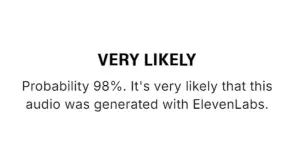
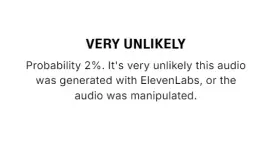
Actually, as per your suggestion in your previous comment na gumamit ng online audio checker, ginamit ko yung tester mismo ni 11labs,
1. RAW file ni 11labs
View attachment 4023296
2. RAW file ni 11labs + distortion and some configurations
View attachment 4023297
For the voice model, gamit ko si Kael. but here's a list of voices.
You do not have permission to view the full content of this post. Log in or register now.
Super dami ng choices, as matter of fact. I am also considering to use either Korean, Japanese, or Chinese language haha. I bet the validator (the admin, who checks the validity of the audio) wouldn't even know if the audio is ai or not.
Here's a sample of a Chinese audio (using Chinese voice model).
RAW VOICE, no configurations yet.
<div><iframe width="300" height="60" src="" frameborder="0" allow="autoplay"></iframe><br><a href="" title="Vocaroo Voice Recorder" target="_blank">View on Vocaroo >></a></div>
agree, so far ito yung medyo decent when it comes to our local language, not bad rin naman yung english version language nila.Maraming paraan to cloak a good AI audio from adding simple imperfections, background noise or any type of dirty processing. Marami na rin high-end vocoders at siyempre yung remixing and editing sa DAW. Ang dami to mention.
(Uy, uy!!! Si T'yo Kael pala yung model he he. )
Ang interest ko kasi sa AI audio ay sa music generation, hindi sa dialogues. Related din naman yung topic natin since meron din metatags and special instructions sa mga lyrics to follow the standard music prompts to control the final music style/arrangement of the resulting song. Di ba sa Suno may combination of genre/mood in the Style field, and structural/instrumental tags within the Lyrics field that controls the final composition? Parehas din yan to generate an artificial dialogue using Elevenlabs na designed for that purpose.
Dyan lang may matinong Filipino models at active sa emotional synthesis/emphatic AI. Limited ako dyan. Naghahanap pa ako ng local AI na gagana sa pc kong laos na he he. Galing naman sa opensource yung dev dyan, pero closed to public view. Sa Huggingface na lang yung pag-asa pag may nag-tip for longer testing.
Ang importante, malaman natin yung hands-on process to replicate it using some minor codes and commands.
aight hahaha. thanks ulit for your inputs.PS. Meron na palang V3 sa puter.js. Na-replicate ko na rin ng kaunti he he.
buti mabait si ᑕᕼᗩTGᑭT sa'kin at may option na akong i-download yung audio.
"uy, uy!!! ... May dalawa sa mid!!! ...... Hala!!! Abangan niyo lang, baka mang-flank yung mga yun eh. ... Check niyo yung gilid-gilid!!! ......... Ay naku!!!... talo na naman tayo!!!"
provider: "elevenlabs",
model: "eleven_v3",
voice: "53HEM9cpXMMsKDVvXwHV",
output_format: "mp3_44100_128"
Same here. May natuklasan din akong bago at binalikan sa thread mo he he.aight hahaha. thanks ulit for your inputs.