 PH
PH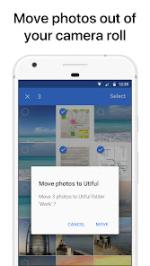
 App Description: Utiful: Move & Organize Photos v9.0.0 [Premium]
Utiful provides the dedicated photo filing system missing from standard Android gallery apps. While Google Photos only creates shortcuts that keep your camera roll cluttered, Utiful allows you to move photos out of the main gallery and into a separate, organized folder structure. It is the ideal tool for professionals and power users who need to decouple work documentation, receipts, and reference images from their personal memories.
Key Features
Move photos entirely out of the camera roll to keep the main gallery clean
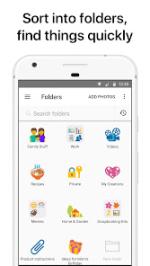
Organize files into custom categories like work, hobbies, and documents
Take photos directly into specific folders using the integrated folder camera
Rearrange images manually within folders for a customized viewing order
Secure sensitive folders with passcode or fingerprint protection
Store data on internal storage or SD cards with full offline access
Preserve original image quality and metadata for all formats including RAW and GIF
Export folders to a computer easily with no cloud lock-in or advertisements
User Workflows
Professionals: Keep project evidence and case documentation separate from personal life
Homeowners: Catalog receipts, IDs, and home maintenance records
Creatives: Store inspiration and project references in a dedicated workspace
 What's New: - Improved data safety with automatic data restore after reinstall.
- + Storage Saver Mode now supports videos, with optional sound recording.
- + Improved photo quality in Storage Saver Mode, with up to 99% storage saving.
- + Camera sounds can now be enabled from camera settings.
 MOD Features:
- Save photos to Utiful folders straight from the Photos app and from the Gallery app.
- Take photos with the folder camera that save directly to the folder.
- Manually rearrange photos in a folder—just the way you like.
- Customize the icons of your photo folders with emoji symbols and colors.
- Keep your Utiful folders on internal storage or SD card.
- Protect your Utiful folders with a passcode lock or fingerprint.
- Import/export photo folders from/to your computer.
- Professionals & freelancers keeping work photos separate from personal ones
- Contractors & service providers managing before/after project pictures
- Doctors & lawyers organizing reference photos, evidence, and case documentation
- Hobbyists & creatives storing inspiration, artwork, and craft ideas
- Open Utiful, tap "Add Photos", select photos from the camera roll and tap "Move".
- Or, while in the Photos or Gallery app, select photos, tap Share and choose Utiful.
- No Internet required: You can keep organizing photos offline without any issues.
- No ads: Enjoy undistracted productivity while organizing your photos.
- ✪ Premium
- unlocked;
- ✪ All Debug Codes Removed;
- ✪ CPUs: armeabi-v7a, arm64-v8a;
- ➥ Modded By TRUMods
 Download Link:
Download
Download Link:
Download