 PH
PH-
Welcome to PHCorner Forums! Sign up for free to unlock full access and exclusive privileges, including:
- Asking questions about computer and mobile issues
- Discovering internet tips for your mobile network and computer
You are using an out of date browser. It may not display this or other websites correctly.
You should upgrade or use an alternative browser.
You should upgrade or use an alternative browser.
👨🏫 Tutorial Black box api key
- Thread starter Amaros
- Start date
wala po eh sorrySir may proxy ka pa na benebenta?
ubusin nyo na yan may 1.6k balance pa ehhematsalove boss amo
Working naman yung api! Ngayon, makakatikim na rin ako ng medyo malalakas na models sa coding sa free IDE nya sa Windows. OK din yung free IDE ng Blackbox. Sulit yung interface as alternative to VSCode. Kahit potato pc di mag-hang. Salamat sa'yo, nadiskubre ko na may IDE na pala sila na multi-purpose gamitin instead a web app. Sulit!ubusin nyo na yan may 1.6k balance pa ehhe
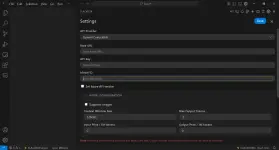
Pwede dito gamitin yung maraming supported AI api providers or any OpenAI compatible api. Ayos!
Note: Pag masiba sa video gagamit, at hindi sa coding, oras lang ubos na api credits @$0.75 per second he he.
akin subs credits i shashare ko namn api key creditsWorking naman yung api! Ngayon, makakatikim na rin ako ng medyo malalakas na models sa coding sa free IDE nya sa Windows. OK din yung free IDE ng Blackbox. Sulit yung interface as alternative to VSCode. Kahit potato pc di mag-hang. Salamat sa'yo, nadiskubre ko na may IDE na pala sila na multi-purpose gamitin instead a web app. Sulit!
View attachment 4015321
Pwede dito gamitin yung maraming supported AI api providers or any OpenAI compatible api. Ayos!
Note: Pag masiba sa video gagamit, at hindi sa coding, oras lang ubos na api credits @$0.75 per second he he.
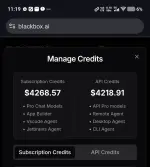
Salamat. Para yan sa mga needy. Di na ako sasali para tumagal he he -unless needed. Marami pa naman akong free apis na nakatabi. The IDE is enough to test/experiment. Merong free LLMs yung IDE rin kaya 2 in one sa mga gagamit.
Salamat, verified working key!change key sorry na delete ko
Sawa ako sa free LLM model testing he he: llama-4-maverick:free, deepseek-chat-v3-0324:free, deepseek-r1-0528:free, qwen3-235b-a22b:free, qwen-2.5-72b-instruct:free (plus yung ibang may vision models) para di mabawasan credits mo...Parang openrouter models sila!
juantamoda
Fanatic
paturo naman po kung paano po to paganahin sa vscode? maraming salamat
Basahin mo na yung guide dyan using BYOK (bring your own key) method sa VSCODE:paturo naman po kung paano po to paganahin sa vscode? maraming salamat
You do not have permission to view the full content of this post. Log in or register now.
You do not have permission to view the full content of this post. Log in or register now.
Hanap ka ng extension nyan sa marketplace - try mo "black box" (first 3 sa search) or use "ai toolkit for visual studio code". Sa Blackbox IDE ko nasubukan yan! Sa ibang mga LLM interface ang gamit ko sa api testing - open-webui, anythingllm, py-desktop, or just sa addons, etc.
Check mo ito na nasa Blackbox IDE or to be installed sa VSCODE:
You do not have permission to view the full content of this post. Log in or register now.
(ang caveat nito, pang premium user ng blackbox ito to integrate with vscode)
Hanapin mo sa settings yung paggamit ng api key at base url ng AI providers. Pag wala sa list yung blackbox, ilagay mo na lang sa Custom or OpenAI compatible api option, custom endpoint, custom model (which is common), then save.
Nag-respond naman using Blackbox agent (sa VSXODE), pero may lumalabas na warning pag umulit ka for premium). Kaya try mo sa "ai toolkit for visual studio code"
You do not have permission to view the full content of this post. Log in or register now.
Stated naman dito yang instructions:
You do not have permission to view the full content of this post. Log in or register now.
Using your own language model API key in VS Code has several benefits:Quote: .......
- Model choice: access hundreds of models from different providers, beyond the built-in models.
- Experimentation: experiment with new models or features that are not yet available in the built-in models.
- Local compute: use your own compute for one of the models already supported in GitHub Copilot or to run models not yet available.
- Greater control: by using your own key, you can bypass the standard rate limits and restrictions imposed on the built-in models.
- Use one of the You do not have permission to view the full content of this post. Log in or register now.
- Install a You do not have permission to view the full content of this post. Log in or register now. from the Visual Studio Marketplace, for example, You do not have permission to view the full content of this post. Log in or register now.
You do not have permission to view the full content of this post. Log in or register now.
...........Note:
1. sa model cards, use this link: You do not have permission to view the full content of this post. Log in or register now.
2. para makuha mo yung paggamit ng api, go to blackbox ai site and browse the playground on how the api work: You do not have permission to view the full content of this post. Log in or register now.
PS. Same yang Blackbox IDE at VSCODE IDE usage. Sa Blackbox agent screen may option dyan sa API (na katabi ng Blackbox icon sa taas). Doon mo ilagay yung API requirements per model via "OpenAI Compatible" button, then click save.
Since public api key yan at maraming gumagamit, mag-intay ka ng access mo sa peak hours.
Di ko maget paano ilagay yung api sa vscode
He he, naintindihan ko kayo mga anak! Kahit ako, nag-umpisa rin ng ganyan. Eto yung short guide na direct:ang lalim pala na usapan...di kaya ng powers ko...
Kung buhay yung api key ng Blackbox AI sa first post, pwede nyong gamitin yan as an OpenAI compatible api tulad ng OpenAI, Google Gemini, Claude atbp. mga apis. Kung nakagamit na kayo ng mga apis, siyempre may corresponding endpoints yan to use the models using the base url. Yung base url ng Blackbox api is "You do not have permission to view the full content of this post. Log in or register now.". Since hindi officially supported yung Blackbox AI api provider sa isang app, ang last resort is use the option as an OpenAI compatible api (sa AI providers menu if meron doon option). Hindi na base url yung maaaring magamit kundi ang endpoint for a specific model task like chat completions, image generation, etc. na supported ng AI provider. for chat completions, ang endpoint nyan is "You do not have permission to view the full content of this post. Log in or register now.". Sa models, check nyo sa You do not have permission to view the full content of this post. Log in or register now.yung "model card id" na gagamitin ninyo sa chat completions out of the present 399 models for different tasks. Dahil dyan, magagamit nyo na yung BB-api sa kahit anong AI app na kaya siyang ipasok at paganahin! Hindi naman specific na gamitin siya sa VSCODE di ba? Github copilot lang ang official AI coding assistant dyan and the rest is using an extension.
So, kailangan nyo ng plugin/extention doon na nag-support ng Blackbox AI api or openAI compatible api. Install nyo yung plugins (blackbox coding agent...or AI tools for vscode) sa marketplace sa last post ko to get it done or install the BlackboX IDE na free sa Blackbox website. May malaking icon na API doon! Click nyo and the rest is up to you after clicking "Save" in the end. Lalabas ng taas ng prompt bar yung model na pinasok nyo using the api key provided. Ako rin, nalito noong una kung saan ilagay. Tinest ko lang kung gagana sa VSCODE and Blackbox IDE (which are the same). Malinaw na siguro sa lahat!
Grabeh, dami pera loads. Sana may tutorial kung paano yan.
Sa ngayon, error na yung account ni galanteng TS:
Sorry sa mga nahuli.
Abang na lang kayo sa $$$$$ updates at api renewal.
Ni hindi ko pinakialaman yan he he. Napapa-iling ako sa presyo!{
"error": {
"message": "{'error': {'message': 'Account ,,,,,,,,,@gmail.com suspended. Your account has exceeded the spending threshold (745.14spentwith745.14 spent with745.14spentwith6248.65 budget). Please contact support at ......@blackbox.ai to unblock your request.', 'type': 'account_suspended', 'code': 'account_suspended', 'current_spend': 745.1367643499999, 'max_budget': 6248.649989999994, 'available_credits': 5503.513225649995}}",
Sorry sa mga nahuli.
Abang na lang kayo sa $$$$$ updates at api renewal.
wa wow woww 5503.513225649995 creds huhu, sayangSa ngayon, error na yung account ni galanteng TS:
Ni hindi ko pinakialaman yan he he. Napapa-iling ako sa presyo!
Sorry sa mga nahuli.
Abang na lang kayo sa $$$$$ updates at api renewal.
Parehas din yan ng Elevenlabs api key na ginamit mo sa iyong pinakitang app sa'kin, pero for TTS (to create speech) as stated sa api documentation nila: You do not have permission to view the full content of this post. Log in or register now.. Meron din siyang function for speed to text kung enabled sa api ng nagbigay.Grabeh, dami pera loads. Sana may tutorial kung paano yan.
Yang api key ng Blackbox, may sinusunod din SDK to be used for chatting or text generation - chat completion as stated here: You do not have permission to view the full content of this post. Log in or register now.
Kung gusto mong gamitn yung api key lang w/o entering the required endpoint sa coded app mo, hanap ka ng LLM interface na may builtin support sa Blackbox api. Hindi naman strictly for VSCode yan he he. Recommended lang. Punta ka sa blackboc.ai at pindutin mo yung Docs.
You do not have permission to view the full content of this post. Log in or register now.
Makikita mo sa taas yung recommended nila to use it from Blackbox agent - Agent api (lima yon)!
Kung mahirapan ka, test mo na lang yung Harpa AI browser addon. Create ka ng Custom AI Provider. ilagay mo yung api key, chat model na model card name sa blackbox inference models list ( like blackboxai/openai/gpt-5), api proxy url = You do not have permission to view the full content of this post. Log in or register now.. api proxy path = /chat/completions - ayos na!
Next time, test mo.
Similar threads
-
-
CLAUDE FABLE FREE API KEY and other Top models
- Started by rtramos020317
- Replies: 5
-
-
$200 Credits Free API KEY top models like CLAUDE OPUS-5-5
- Started by rtramos020317
- Replies: 8
-
API KEY FREE CLAUDE,GPT,etc With small multiplier
- Started by rtramos020317
- Replies: 0
About this Thread
-
30Replies
-
2KViews
-
10Participants
Last reply from:
Exorsus
Exorsus
New Topics
-
Pasabit po TGT for job hunting.
- Started by Lalalisaa
- Replies: 0
- 🧠 Artificial Intelligence
-
Elevenlabs - Story Generator - For Content - Yt/Fb
- Started by Meow Meng
- Replies: 4
- 🧠 Artificial Intelligence
-
Ano kaya AI pang Generate ng videos yung mga fb/tktk ai stories
- Started by Slime-
- Replies: 4
- 🧠 Artificial Intelligence
-
ᑕᕼᗩTGᑭT or Nano Banana?
- Started by StevenRogers
- Replies: 0
- 🧠 Artificial Intelligence
-
Change Pose with Prompt
- Started by StevenRogers
- Replies: 1
- 🧠 Artificial Intelligence
-
USING AI AS CONTENT IN OF
- Started by juls91
- Replies: 0
- 🧠 Artificial Intelligence
-
200+ FREE TGT ACCOUNTS!
- Started by menyou
- Replies: 1
- 🧠 Artificial Intelligence
-
Gemini 4 Argon FREE right now
- Started by sff
- Replies: 5
- 🧠 Artificial Intelligence
-
Gemini 4 Argon Is Here: What You Need to Know
- Started by Diego Mendoza
- Replies: 4
- 🧠 Artificial Intelligence
Trending Topics
Online now
- Members online
- 505
- Guests online
- 6,420
- Total visitors
- 6,925