 PH
PH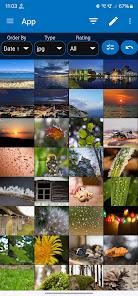
 App Description:
  Photo Mate R3 v4.1.0: The Ultimate All-in-One RAW Editor & Organizer
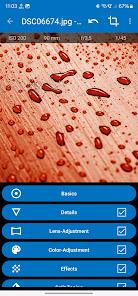
 Professional RAW Editing: Harness the power of non-destructive editing for almost any camera-raw format. Fine-tune white balance, exposure, and more with total precision.
 Smart Library Management: Effortlessly organize, filter, and sort your collection by ISO, aperture, or metadata. Keep your workflow seamless with universal XMP-Sidefile compatibility.
 Advanced Layer Tools: Elevate your shots using Brushes, Gradients, Lasso tools, and Curves. Experience desktop-grade editing right on your Android device!
 Side-by-Side Comparison: Never settle for second best. View and rate images side-by-side to pick your winning shot instantly.
 Lens-Based Corrections: Automatically eliminate distortion, vignetting, and chromatic aberration with the built-in Lens-Collection.
 Power Features: From batch conversion and image stacking to network access and direct camera imports, it’s a complete photography suite in your pocket. Optimized for Android 7.0+: Enjoy a smooth, professional-grade interface designed for modern mobile photography.
Would you like me to create a catchy set of keywords or a tagline for the app store listing?
 What's New: - Auto Segmentation (Beta) with Bokeh DoF
- Improvements for Android 15
- Fix for editing requests from other apps
- Language improvements
- Fixes renaming / gallery view
- Performance improvements, improve Color Noise Performance up to 35%
- Duplicate XMP file fixes
- new Layout with improved design, colors & overall cleanup
 MOD Features:
- Subscription / ρáíd features unlocked;
- Disabled / Removed unwanted Permissions + Receivers + Providers + Services;
- Optimized and zipaligned graphics and cleaned resources for fast load;
- Ads Permissions / Services / Providers removed from AndroidManifest;
- Google Play Store install package check disabled;
- Debug code removed;
- Remove default .source tags name of the corresponding java files;
- Languages: Full Multi Languages;
- CPUs: armeabi-v7a, arm64-v8a, x86, x86_64;
- Screen DPIs: 160dpi, 240dpi, 320dpi, 480dpi, 640dpi;
- Original package signature changed;
- Release by Balatan.
- Select all
 Download Link:
Download
Download Link:
Download