 PH
PHHey guys! I just wanted to share something with you all. I’ve been earning money every day using PopAds, and it’s been working really well for me. To show that this isn’t just talk, I’m sharing all my withdrawal proofs so you can see it’s legit.
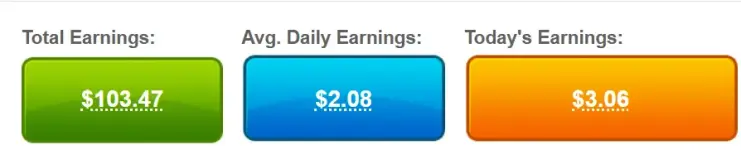
As you can see, I still have 20$ in my account. (I have earned $3.06 today, approximately ₱180.54)
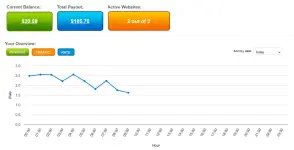
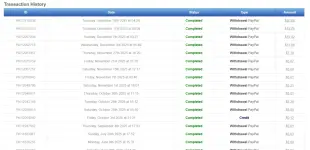
You can visit my website by clicking => You do not have permission to view the full content of this post. Log in or register now..
If you already have a website that’s ready to go, keep reading! If not, take some time to create a great, eye-catching website, one that you think will attract more visitors and get more traffic.
Here's the complete and brief tutorial.
STEP 1. BUY A DOMAIN AND PUBLISH YOUR WEBSITE
You can grab affordable domains from sites like You do not have permission to view the full content of this post. Log in or register now., You do not have permission to view the full content of this post. Log in or register now., and a bunch of others, just search on Google. Once you’ve got your domain, you can host your website for free on platforms like You do not have permission to view the full content of this post. Log in or register now., You do not have permission to view the full content of this post. Log in or register now., or any other free static hosting service.
STEP 2. CREATE A You do not have permission to view the full content of this post. Log in or register now.ACCOUNT
Click this to go to popads signup page => You do not have permission to view the full content of this post. Log in or register now.
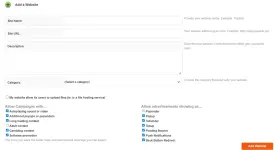
First, create an account on You do not have permission to view the full content of this post. Log in or register now.. Once you’re logged in, go to your dashboard, open the publisher’s panel, and click ‘New Website.’ Then just fill in the required details to get started.
Your website will be approved or denied in 1-3 business days.
STEP 3. ADD POPADS SCRIPT TO YOUR HTML
After your website is approved, click on Code Generator in your dashboard. Tatanungin ka dito kung gaano karami ang ads at kung anong type ng ads ang gusto mong madisplay sa website mo. After the code is generated, ilalagay mo na siya sa html ng website mo between the head element.
STEP 4. PROMOTE YOUR WEBSITE
Start promoting your website to drive more traffic. The more visitors you get, the better your chances of earning!
The minimum withdrawal is 5$. Nagbabago rin ang rate every hour, also, iba pa rin ang revenue kapag galing ibang bansa ang traffic. If you’re planning to make a website, start with a static one first. There are plenty of free templates online. I’d recommend going for a news or entertainment site, it usually attracts more visitors.
You can visit my website by clicking this => You do not have permission to view the full content of this post. Log in or register now.. Kung naguguluhan ka, just comment and I will help you start an account.
As you can see, I still have 20$ in my account. (I have earned $3.06 today, approximately ₱180.54)
You can visit my website by clicking => You do not have permission to view the full content of this post. Log in or register now..
If you already have a website that’s ready to go, keep reading! If not, take some time to create a great, eye-catching website, one that you think will attract more visitors and get more traffic.
Here's the complete and brief tutorial.
STEP 1. BUY A DOMAIN AND PUBLISH YOUR WEBSITE
You can grab affordable domains from sites like You do not have permission to view the full content of this post. Log in or register now., You do not have permission to view the full content of this post. Log in or register now., and a bunch of others, just search on Google. Once you’ve got your domain, you can host your website for free on platforms like You do not have permission to view the full content of this post. Log in or register now., You do not have permission to view the full content of this post. Log in or register now., or any other free static hosting service.
STEP 2. CREATE A You do not have permission to view the full content of this post. Log in or register now.ACCOUNT
Click this to go to popads signup page => You do not have permission to view the full content of this post. Log in or register now.
First, create an account on You do not have permission to view the full content of this post. Log in or register now.. Once you’re logged in, go to your dashboard, open the publisher’s panel, and click ‘New Website.’ Then just fill in the required details to get started.
Your website will be approved or denied in 1-3 business days.
STEP 3. ADD POPADS SCRIPT TO YOUR HTML
After your website is approved, click on Code Generator in your dashboard. Tatanungin ka dito kung gaano karami ang ads at kung anong type ng ads ang gusto mong madisplay sa website mo. After the code is generated, ilalagay mo na siya sa html ng website mo between the head element.
Code installation instructions:
Please paste the code anywhere between <head> and </head>. We suggest to install it directly above </head>. Please make sure you are not using any other popup/popunder code together with our code on the same page.
After installing the code, please use our You do not have permission to view the full content of this post. Log in or register now. tool to verify that everything is fine.
STEP 4. PROMOTE YOUR WEBSITE
Start promoting your website to drive more traffic. The more visitors you get, the better your chances of earning!
The minimum withdrawal is 5$. Nagbabago rin ang rate every hour, also, iba pa rin ang revenue kapag galing ibang bansa ang traffic. If you’re planning to make a website, start with a static one first. There are plenty of free templates online. I’d recommend going for a news or entertainment site, it usually attracts more visitors.
You can visit my website by clicking this => You do not have permission to view the full content of this post. Log in or register now.. Kung naguguluhan ka, just comment and I will help you start an account.