 PH
PH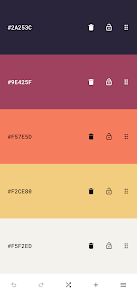
 App Description:
  Pigments: Your Ultimate Color Palette Studio
 Transform your creative workflow with Pigments, the premium mobile solution for professional color curation and design.
 Infinite Inspiration: Generate stunning, harmonious color palettes in seconds with a single tap.
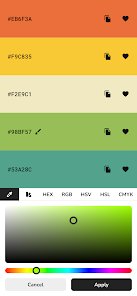
 Precision Editing: Fine-tune hex codes, RGB, and CMYK values with a powerful, intuitive interface.
 Image Extraction: Pull breathtaking color schemes directly from your favorite photos.
 Accessibility First: Ensure your designs are inclusive with built-in color blindness simulators and contrast checkers.
 Seamless Export: Move your palettes effortlessly into Adobe Photoshop, Illustrator, or CSS for web development.
 Plus Features Unlocked: Access exclusive tools and unlimited palette storage to keep your creativity flowing. Optimized Performance: Enjoy a smooth, ad-free experience designed for Android 7.0 and above.
Elevate your art, branding, and UI design today with the most versatile color tool on the market!
Would you like me to generate a set of high-converting app store keywords to go along with this description?
 What's New: - Updated libraries.
 MOD Features:
 - Create color schemes instantly with a single tap.
- Choose from a variety of generator modes: random, gradient, pastel, neutral, metallic, AI-powered (artificial intelligence) generator modes, and more.
- Great for artistic inspiration and fast creative workflows.
- Modify individual colors using the color picker mode of your choice (visual, HEX, RGB, HSV, HSL, or CMYK).
- Adjust the hue, saturation, brightness or temperature of the entire color palette.
- Add up to 30 colors to a palette.
- Rearrange colors in any order.
- Prevent specific colors from changing when generating a new color scheme.
- Undo or redo changes made to the color palette.
- Color wheel - Interactive RGB and RYB color wheels for generating color harmonies (monochromatic, analogous, complementary, compound, triadic, and more).
- Contrast checker - Check the WCAG contrast score between two colors.
- Simulate color vision deficiencies - Validate the accessibility of a color palette by simulating color blindness (protanopia, deuteranopia, tritanopia, etc.).
- Isolation mode - Add spacing around the colors for better contrast.
- Blend mode - Mix two colors together.
- Image color picker - Create color palettes from images by manually selecting the colors or by using the auto-pick feature.
- Image color palette collage - Export a collage containing an image and its color palette.
- Browse an inspiring online library of curated color palettes.
- Enable the minimal UI mode for a distraction-free interface.
- Choose between a light and a dark color theme.
- Save color palettes locally and organize them with tags.
- Export palettes in multiple formats compatible with design tools.
- Share palettes via link for collaboration or showcasing your work.
- Web developers & UI/UX designers
- Digital artists & illustrators
- Brand designers & marketers
- Students & design educators
- Anyone working with colors.
- • Log in necessary to access Experimental Palette type
- • Backup won't happen though as that's checked from server side
 Download Link:
Download
Download Link:
Download