 PH
PHHOW TO BYPASS TUT 101
credits ragde_
1.Find Folder capcut "example > "C:\Users\prayb\AppData\Local\CapCut\Apps"
2.Find Files "update.exe" and what ever u want renamed "update123.exe" or another method u can change also name on notepad.exe ,same method on 1, and 2,.
3.you need uncheck checker updater, Go to "Menu">More>Version:1.5.0) uncheck "Try beta test version to enjoy the new features."
4.Go to Folder "CapCut\Apps\1.5.0.230" Find "capcut.exe" and you need
rename it "capcut1.5.0.230.exe" and create shourtcut on desktop "CapCut 1.5.0.230.exe - Shortcut"
Download
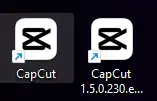
REMINDER : If you see "Capcut.exe" on desktop , mean they already did update without being notice, just leave him ,and use better "CapCut 1.5.0.230.exe" Bypass
REMINDER : If you see "Capcut.exe" on desktop , mean they already did update without being notice, just leave him ,and use better "CapCut 1.5.0.230.exe" Bypass