 PH
PH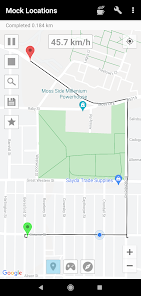
 App Description: *
  GPS Control Mastered: Take absolute command of your device's location data! Mock Locations [Premium] is the definitive professional tool for simulating precise GPS and network operator coordinates on demand.
*
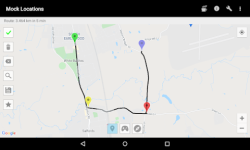
 Dynamic Path Simulation: Don't just fake a location—fake a journey. Easily plot custom routes on the map and press "Go!" to simulate realistic, real-time movement, perfect for sophisticated testing and privacy masking.
*
 Essential Developer Utility: Streamline your application development process. Test geo-fencing features, validate location-based services, and debug complex GPS interactions without ever leaving your desk.
*
 Ultimate Privacy Shield: Mask your true whereabouts from third-party applications and services. Whether for privacy or testing, ensure that only the simulated location is ever reported by your device.
*
 Premium Power Features: Unlock system-level s†éálth and control. The Premium version enables advanced features like hiding the application and utilizing Root access for seamless operation without needing the standard "Allow mock locations" developer setting.
*
 Advanced Integration (Root/Xposed): Designed for power users. Achieve maximum stability and undetectable spoofing by installing directly to the system partition or utilizing specialized modules (compatible with Xposed Framework) to hide mock location settings from specific apps.
*
 Requirements: Compatible with Android 5.0 and above. Note: Full system bypass functionality requires device Root access.
  What's New: Reduced battery consumption
 MOD Features:
 - Emulation GPS location and according to the service provider.
- Ability to create a route on roads.
- Ability to set breakpoints and specify the stay in them.
- Ability to set a variable speed.
- Closed route. (Allows you to build a route for movement along a closed path. To do this, lay the route so that the start and end points were near.)
- You can use the braking before bends. (Settings -> Slows down before the turn)
- You can run the emulation location at one point.
- You can hide an application icon from the status bar. (Settings -> Hide Icon)
- Thank Levin Faber and Ben Black for translation into German.
- Thank Luca Boscaini for the Italian translation.
- ◉ Activated Premium
- ◉ Removed all debug information
- ➡ Languages: Full Multi Languages
- ➡ CPU architectures: arm64-v8a, armeabi-v7a, x86, x86_64
- ➡ Screen DPIs: 120dpi, 160dpi, 240dpi, 320dpi, 480dpi, 640dpi
- ► Credit : NURIK
 Download Link:
Download
Download Link:
Download