 PH
PH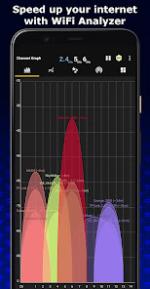
Here is the content organized into clear, structured sections:
 WiFi Analyzer
 App Description & Purpose
The WiFi Analyzer app is designed to help you analyze and optimize your wireless network. It turns your Android device into a professional WiFi analysis tool, providing useful optimization information to help decrease interference and increase connection speed and stability.
Core Recommendations:
- Recommends the best channel for your network.
- Recommends the best place for your network.
 Key Features
- WiFi Optimizer for interference issues.
- Channel Analyzer for nearby Access Points (APs).
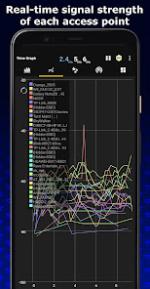
- Real-time data and distance calculations.
- History of signal strength.
- Supports 2.4GHz/5GHz/6GHz frequency bands.
- Ability to view Hidden WiFis.
- Option to Copy MAC address.
- Channel Optimizer.
- + Much More!
 What's New & Enhancements
WiFi Analyzer has been improved with new features and better functionality:
- Expanded Language Support: Translated to 17 languages, with more coming soon.
- WiFi 6GHz Support: Now supports the newer WiFi 6GHz band.
- Display Improvements: Displays channel width by default.
- Android Compatibility: Supports Android 13.
- Network Analysis:
- Shows the best channels for connected AP.
- Detects who is connected to your WiFi.
- Tools & Utilities:
- WiFi Speed Test.
- Signal Tracker Mod.
- Export Graphs.
- View detailed information about your connection.
- Connect to open WiFi networks within the app.
- User Experience: Remembers your preferences.
 MOD Features (Premium/ρáíd Unlocked)
This section details the modifications made to the app's package for the unlocked version:
- Premium / ρáíd features unlocked.
- Permissions & Services:
- Disabled / Removed unwanted Permissions, Receivers, Providers, and Services.
- Ads Permissions / Services / Providers removed from AndroidManifest.
- Optimization:
- Optimized and zipaligned graphics and cleaned resources for fast load.
- Debug code removed.
- Remove default .source tags name of the corresponding java files.
- Advertising & Security Bypass:
- Ads links removed and invokes methods nullified.
- Ads layouts visibility disabled.
- Google Play Store install package check disabled.
- Compatibility:
- AOSP compatible mode.
- CPUs: universal architecture.
- Screen DPIs: 120dpi, 160dpi, 240dpi, 320dpi, 480dpi, 640dpi.
- Analytics: Analytics / Crashlytics / Firebase disabled.
- Language: Full Multi Languages.
- Signature: Original package signature changed. (Release by Balatan)
 Download Link:
Download
Download Link:
Download