 PH
PH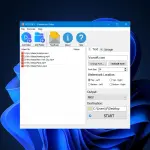
Vovsoft Watermark Video is an easy to use Windows application designed to protect your video content with customizable watermarks. Whether you're a content creator, marketer, or simply want to personalize your videos, this software offers a user-friendly solution.
Social media lets you share videos; including YouTube, Instagram, Facebook, Twitter, etc. The freedom and flexibility the Internet provides you with come with a downside, namely the fact that your creations are constantly at risk. This is because, if measures are not taken, they can be claimed by people who actually have nothing to do with them. One simple way of staying out of harms way is to protect your work with a watermark, which makes your copyright more difficult to infringe.
This tool supports adding:
- Text watermark
- Image watermark
- Both text watermark and image watermark
Add text watermark to video files
This program helps you apply a text watermark to your clips. This feature is invaluable for branding, or adding copyright information directly onto the video. The user interface it prompts you with entails just a few controls, and you need to start by selecting the files you want to process. Alternatively, you can use drag and drop, which should come in handy especially if you are working with a large number of videos.Add image watermark to video files
Additionally, the software enables users to overlay image watermarks onto their videos. Users can choose from a range of image formats and position the watermark precisely where they want it on the video screen. This is ideal for adding logos, graphics, or decorative elements to videos. PNG, JPG, BMP, GIF formats are supported.With this tool, users can easily add multiple video files to the processing list. Once added, the software provides the flexibility to apply watermarks in various positions:
- Top-left
- Top-right
- Bottom-left
- Bottom-right
Category: Audio & Multimedia
 Video Tools
Supports:
 Windows 11, Windows 10, Windows 8/8.1, Windows 7 (32-bit & 64-bit)
Language: English
Licence Type: Lifetime
Licence Key:
7G1WJ-Y6T2X-CNDE8