 PH
PHStep-by-Step Guide by H4lfLif3 (New Method):
Requirements:
• ReVanced Xposed by ChsBuffer & ReVanced
You do not have permission to view the full content of this post. Log in or register now.
• FPA by hicores 未认证创作者
You do not have permission to view the full content of this post. Log in or register now.
You do not have permission to view the full content of this post. Log in or register now.
• Spotify APK (UnTouched)
•yosi 
Procedures:
1. Open Play Store then check the latest version of Spotify.
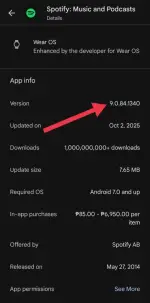
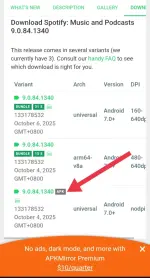
2. Now, go to You do not have permission to view the full content of this post. Log in or register now. and download the APK of Spotify from APKMirror.
3. Open the FPA app.
Note: Tsekwa ang app na 'to mga bossing, kaya sundan lang po ang screenshots.
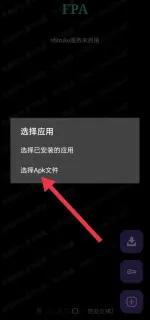
4. Click the [+] icon at the bottom right.

5. Tap 选择Apk文件 (Select Apk File).
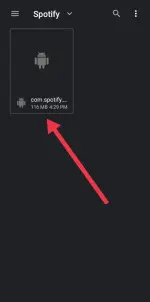
6. Select the Spotify APK (com.spotify...) from APKMirror.
7. Click the 执行PATCH (Execute PÁTCH) button.
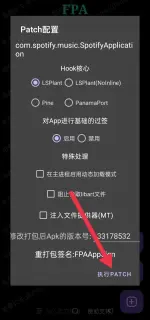
8. Wait until the execution is complete(yosi muna). 
9. Tap 安装 (Install) button at the bottom right.
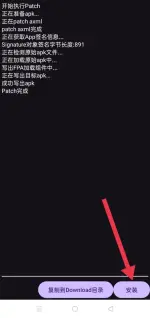
10. After installation, press back (or restart the FPA app).
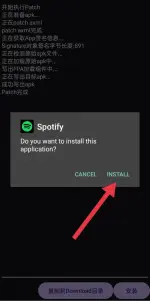
11. Click the patched Spotify in the list.
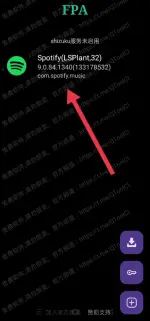
12. Tap 设置作用域 (Settings).
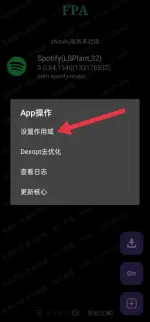
13. Then, enable the ReVanced Xposed.
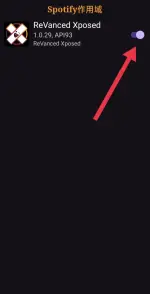
14. Log in to Spotify with your email and password. Enjoy!
Requirements:
• ReVanced Xposed by ChsBuffer & ReVanced
You do not have permission to view the full content of this post. Log in or register now.
• FPA by hicores 未认证创作者
You do not have permission to view the full content of this post. Log in or register now.
Android 10 and upYou do not have permission to view the full content of this post. Log in or register now.
Android 10 or lower• Spotify APK (UnTouched)
•
Procedures:
1. Open Play Store then check the latest version of Spotify.
2. Now, go to You do not have permission to view the full content of this post. Log in or register now. and download the APK of Spotify from APKMirror.
3. Open the FPA app.
Note: Tsekwa ang app na 'to mga bossing, kaya sundan lang po ang screenshots.
4. Click the [+] icon at the bottom right.
5. Tap 选择Apk文件 (Select Apk File).
6. Select the Spotify APK (com.spotify...) from APKMirror.
7. Click the 执行PATCH (Execute PÁTCH) button.
8. Wait until the execution is complete
9. Tap 安装 (Install) button at the bottom right.
10. After installation, press back (or restart the FPA app).
11. Click the patched Spotify in the list.
12. Tap 设置作用域 (Settings).
13. Then, enable the ReVanced Xposed.
14. Log in to Spotify with your email and password. Enjoy!
 Working yung spotify. Tanong lng po. Ok lng po iuninstall yung fpa after napagana yung spotify? Thanks po


 I hope this method really works forever I'm tired of error

