PH
PHMad Engineer
Eternal Poster
Nais ko lang e share yung ginagamit ko ngayon for injecting manifests and lua files directly sa steam sa pamamagitan ng Manilua Plugin na ilalagay natin dun sa Millenium na naka install sa steam mo.
Prerequisites:
~ You do not have permission to view the full content of this post. Log in or register now. - Download niyo lang kasi importante ito.
~ Millenium - Install via PowerShell or Terminal [as admin] at ipaste niyo ito ( iwr -useb "You do not have permission to view the full content of this post. Log in or register now." | iex ) , alisin niyo lang yung parenthesis
~ Disc0rd - Mag install ka na ng disc0rd at e log in ang account mo for authenticating manilua
after niyo ma install ang millenium wag niyo muna e open ang steam niyo, paki follow muna yung procedure
1. Download the manilua plugin You do not have permission to view the full content of this post. Log in or register now.
2. Punta ka sa steam directory at kung first time mo mag install ng millenium gawa ka ng folder dun na plugins, gaya ng nasa picture sa baba
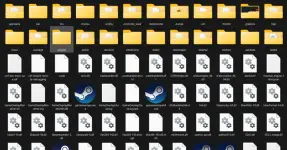
3. Open mo yung bagong gawa na folder, gamit ang winrar or 7zip, dito mo ilagay or i extract yung dinownload mo na manilua plugin

4. Open mo na yung steam mo at e log in yung account mo [Depende na sayo kung main account or dummy account gagamitin mo
5. Pindutin mo yung steam sa top left corner at makikita mo yung ininstall mo na millenium
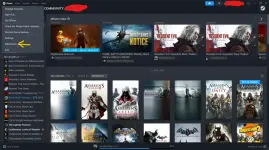
6. Pag andun kana sa millenium punta ka sa plugin para e switch on mo yung manilua plugin and then save changes
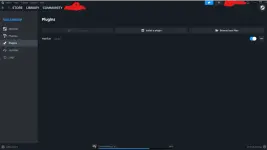
7. ngayon after mo ma switch on yung manilua plugin e restart mo yung steam mo
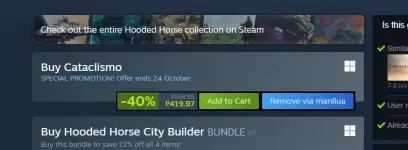
8. Pagka open mo ng steam mo punta ka sa steam store at pumili ka ng games na gusto mo at sa tabi ng add to cart makikita mo yung add via manilua
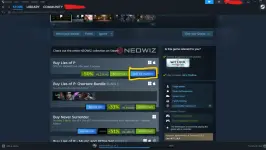
9. Relax lang di pa tayo tapos hahaha! dito na natin kakailanganin ang #forbidden#, pag ka pindot mo ng add via manilua, may lalabas na ganito at e click mo yung open beta blah blah blah
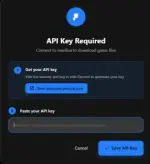
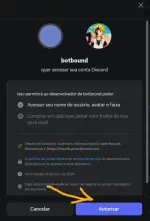
10. At mapupuna ka naman dito, na authonticate ko na yung sakin kung kaya't ganyan yung na sa arrow, sa case mo ang naka lagay dyan ay authonticate with #forbidden# at pindutin mo yun and then ma reredirect ka dun sa #forbidden# at click mo lang yung authorize
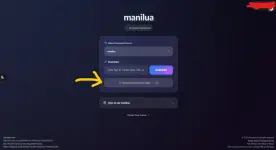
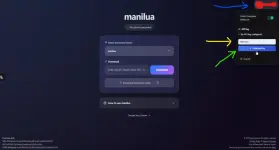
11. After nyan balik kayo dun sa second tab kanina, click niyo yung profile niyo yung nasa blue arrow, sa yellow arrow naman kahit ano na lang ilagay niyo kayo bahala and then click niyo yung sa green arrow para makapag generate kayo ng API key, copy niyo yun at punta kayo dun sa first tab kanina
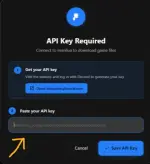
12. I paste niyo na yung na generate niyo na API key at bumalik ka na ulit dun sa steam store at pumili ka ng games na gusto mo at pindutin ang add via manilua
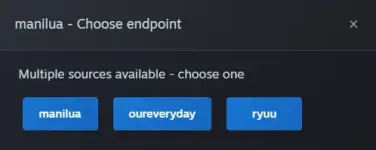
13. After mo ma add via manilua may 3 sources kang pag pipilian kung saan siya mag dadownload ng manifest and lua files, depende na sa inyo kung saan ang gusto niyo pero para sa akin Ryuu yung pipiliin ko kasi base sa experience ko lagi itong updated kumpara sa manilua
14. Hintayin mo lang matapos and then sa pamamagitan ng popup icon ni Steamtools e restart mo yung steam mo or kung wala kang steamtools e close mo lang yung steam mo then launch mo ulit after nun punta ka sa library mo tapos dun mo hanapin sa uncategorized yung na inject mo na games sa steam mo.
Ang kagandahan nito hindi na pahirapan pa mag hanap ng steam appID dun sa steamdb and kung gaano kadali mag lagay ng manifests and lua files dun sa steam mo ganun din kadali mag tanggal nito punta ka lang ulit sa steam store at e search mo yung games na gusto mo alisin and sa tabi ng add to cart makikita mo dun yung remove via manilua
at ang pang huli tulad pa rin ng dati hindi pwede ang mga games na may denuvo at may 3rd party launcher tulad ng ubisoft, ea, rockstar and etc.
Prerequisites:
~ You do not have permission to view the full content of this post. Log in or register now. - Download niyo lang kasi importante ito.
~ Millenium - Install via PowerShell or Terminal [as admin] at ipaste niyo ito ( iwr -useb "You do not have permission to view the full content of this post. Log in or register now." | iex ) , alisin niyo lang yung parenthesis
~ Disc0rd - Mag install ka na ng disc0rd at e log in ang account mo for authenticating manilua
after niyo ma install ang millenium wag niyo muna e open ang steam niyo, paki follow muna yung procedure
1. Download the manilua plugin You do not have permission to view the full content of this post. Log in or register now.
2. Punta ka sa steam directory at kung first time mo mag install ng millenium gawa ka ng folder dun na plugins, gaya ng nasa picture sa baba
3. Open mo yung bagong gawa na folder, gamit ang winrar or 7zip, dito mo ilagay or i extract yung dinownload mo na manilua plugin
4. Open mo na yung steam mo at e log in yung account mo [Depende na sayo kung main account or dummy account gagamitin mo
5. Pindutin mo yung steam sa top left corner at makikita mo yung ininstall mo na millenium
6. Pag andun kana sa millenium punta ka sa plugin para e switch on mo yung manilua plugin and then save changes
7. ngayon after mo ma switch on yung manilua plugin e restart mo yung steam mo
8. Pagka open mo ng steam mo punta ka sa steam store at pumili ka ng games na gusto mo at sa tabi ng add to cart makikita mo yung add via manilua
9. Relax lang di pa tayo tapos hahaha! dito na natin kakailanganin ang #forbidden#, pag ka pindot mo ng add via manilua, may lalabas na ganito at e click mo yung open beta blah blah blah
10. At mapupuna ka naman dito, na authonticate ko na yung sakin kung kaya't ganyan yung na sa arrow, sa case mo ang naka lagay dyan ay authonticate with #forbidden# at pindutin mo yun and then ma reredirect ka dun sa #forbidden# at click mo lang yung authorize
11. After nyan balik kayo dun sa second tab kanina, click niyo yung profile niyo yung nasa blue arrow, sa yellow arrow naman kahit ano na lang ilagay niyo kayo bahala and then click niyo yung sa green arrow para makapag generate kayo ng API key, copy niyo yun at punta kayo dun sa first tab kanina
12. I paste niyo na yung na generate niyo na API key at bumalik ka na ulit dun sa steam store at pumili ka ng games na gusto mo at pindutin ang add via manilua
13. After mo ma add via manilua may 3 sources kang pag pipilian kung saan siya mag dadownload ng manifest and lua files, depende na sa inyo kung saan ang gusto niyo pero para sa akin Ryuu yung pipiliin ko kasi base sa experience ko lagi itong updated kumpara sa manilua
14. Hintayin mo lang matapos and then sa pamamagitan ng popup icon ni Steamtools e restart mo yung steam mo or kung wala kang steamtools e close mo lang yung steam mo then launch mo ulit after nun punta ka sa library mo tapos dun mo hanapin sa uncategorized yung na inject mo na games sa steam mo.
Ang kagandahan nito hindi na pahirapan pa mag hanap ng steam appID dun sa steamdb and kung gaano kadali mag lagay ng manifests and lua files dun sa steam mo ganun din kadali mag tanggal nito punta ka lang ulit sa steam store at e search mo yung games na gusto mo alisin and sa tabi ng add to cart makikita mo dun yung remove via manilua
at ang pang huli tulad pa rin ng dati hindi pwede ang mga games na may denuvo at may 3rd party launcher tulad ng ubisoft, ea, rockstar and etc.