 PH
PHClean Your System and Free Disk Space

When your computer is getting full, BleachBit quickly frees disk space. When your information is only your business, BleachBit guards your privacy. With BleachBit you can free cache, delete cookies, clear Internet history, shred temporary files, delete logs, and discard junk you didn't know was there. Designed for Linux and Windows systems, it wipes clean thousands of applications including Firefox, Adobe Flash, Google Chrome, Opera, and You do not have permission to view the full content of this post. Log in or register now.. Beyond simply deleting files, BleachBit includes advanced features such as shredding files to prevent recovery, wiping free disk space to hide traces of files deleted by other applications, and vacuuming Firefox to make it faster. Better than free, BleachBit is open source.
Features
Concerned about privacy and disk space? BleachBit is your solution! In today's digital world, it’s essential to protect your personal information. With just a few clicks, you can easily delete unwanted files and permanently erase sensitive data, ensuring your confidentiality and giving you peace of mind.
BleachBit has many useful features designed to help you easily your computer to free space and maintain privacy.
- Shred sensitive files, so one can ever read their contents.
- You always have the "Pro" version: BleachBit is You do not have permission to view the full content of this post. Log in or register now.
- Anonymous: you do not need to register an account
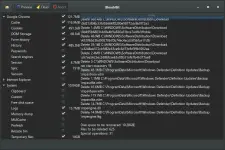
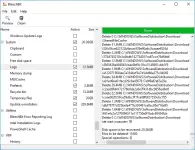
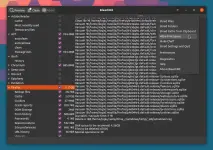
- Simple to operate: read the descriptions, check the boxes you want, click preview, and click delete.
- Multi-platform: it runs on both Linux and Windows
- What's hiding in your software? BleachBit is free to share, learn, and modify because it is open source, so there are no secrets.
- No adware, spyware, telemetry, malware, bloatware, backdoors, browser toolbars, or "value-added software"
- Translated to You do not have permission to view the full content of this post. Log in or register now.
- Overwrite free disk space to hide previously deleted files
- On Windows, choose to either install or run in portable mode. like from a USB drive.
- You do not have permission to view the full content of this post. Log in or register now. for scripting and automation
- Advanced users can write their own cleaners using You do not have permission to view the full content of this post. Log in or register now.
- Automatically import and update You do not have permission to view the full content of this post. Log in or register now. cleaner files giving Windows users access to thousands of additional cleaners
Uses
Use BleachBit to:- Free disk space
- Reduce the size of backups and the time to create them by removing unnecessary files
- Maintain privacy
- Improve system performance
- Prepare system for backups by removing junk data that wastes space and time.
- Prepare whole disk images for compression (common for "ghost" backups and virtual machines) by wiping free disk space
Cleaners
Cleaners contain the rules for cleaning specific applications, and BleachBit includes a growing list of cleaners for Google Chrome, Edge, Firefox, VLC, system logs, temporary files, and many others.Many more cleaners for Windows and Linux are available in the You do not have permission to view the full content of this post. Log in or register now..
Add thousands of cleaners by You do not have permission to view the full content of this post. Log in or register now. (Windows only).
Advanced cleaners
Going beyond standard deletion of files, BleachBit has several advanced cleaners:- Clear the memory and swap on Linux
- Delete broken shortcuts on Linux
- Delete the Firefox URL history without deleting the whole file—with optional shredding
- Delete Linux localizations: delete languages you don't use. More powerful than localepurge and available on more Linux distributions.
- Clean APT for Debian, Ubuntu, Kubuntu, Xubuntu, and Linux Mint
- Find widely-scattered junk such as Thumbs.db and .DS_Store files.
- Execute yum clean for CentOS, Fedora, and Red Hat to remove cached package data
- Delete Windows registry keys—often where MRU (most recently used) lists are stored
- Delete the OpenOffice.org recent documents list without deleting the whole Common.xcu file
- Overwrite free disk space to hide previously files
- Vacuum Firefox, Google Chrome, Liferea, Thunderbird, and Yum databases: shrink files without removing data to save space and improve speed
- Surgically remove private information from .ini and JSON configuration files and SQLite3 databases without deleting the whole file
- Overwrite data in SQLite3 before deleting it to prevent recovery (optional)
Download Links:
Download
Kakaunti lang nakakaalam nitong tools na to sa PC eh, mashare ko lang para sumikat. Alternative to nung CCleaner, mas maganda pa BleachBit kesa CCleaner kasi deep cleaner yung BleachBit, walang kulang walang labis yung paglinis hahah. tsaka parang may virus na ata yung CCleaner eh tapos nahäçked yung website nila kamakailan lang at naexploit yung app.
Sources: You do not have permission to view the full content of this post. Log in or register now.
You do not have permission to view the full content of this post. Log in or register now.
You do not have permission to view the full content of this post. Log in or register now.
ty lang sa comments, mamatss