 PH
PHHow To Speed Up Web Browsing Using DNS häçk?
To get a faster internet speed, I’ll tell you about free OpenDNS service. You can also use Google DNS for speeding up your internet. OpenDNS is one of the most popular free DNS services that was started to provide an alternative method to those who were discontented with their existing DNS. Ahead I’m mentioning about OpenDNS; find Google DNS after that.
By following these simple steps, you can tell your computer to use OpenDNS’s DNS servers instead of the ones your service provider automatically uses:
Open DNS:
Step 1:
To get a faster internet speed using OpenDNS, open Control panel.
Step 2:
Go to Network and Internet options.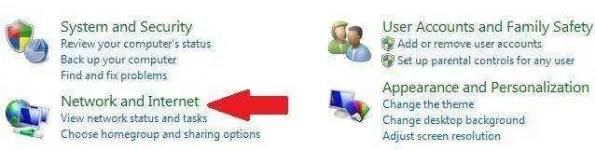
Step 3:
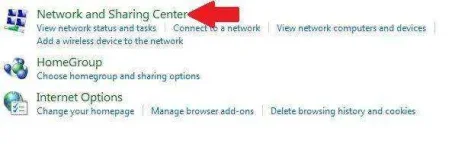
Now click on Network and Sharing Center.
Step 4:
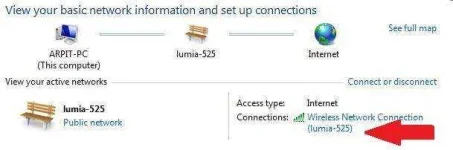
Click on your Internet Connection and then click on Properties.
Step 5:
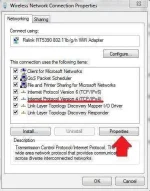
Click the Internet Protocol Version 4 (TCP/IPv4) and click on Properties.
Step 6:
Now choose the following DNS server addresses to get a faster internet speed:
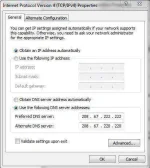
You are using OpenDNS’s servers now which helps you to get a faster internet speed.
To Configure IPv6:
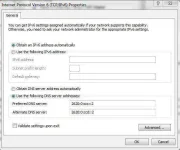
Highlight the Internet Protocol Version 6 (TCP/IPv6) and click on Properties, and choose the following DNS server addresses:
Replace those addresses with the IP addresses of the Google DNS servers in step 6.
For IPv4: 8.8.8.8 and/or 8.8.4.4.
For IPv6: 2001:4860:4860::8888 and/or 2001:4860:4860::8844
source: https://fossbytes.com/simple-dns-häçk-to-get-faster-internet-speed/
To get a faster internet speed, I’ll tell you about free OpenDNS service. You can also use Google DNS for speeding up your internet. OpenDNS is one of the most popular free DNS services that was started to provide an alternative method to those who were discontented with their existing DNS. Ahead I’m mentioning about OpenDNS; find Google DNS after that.
By following these simple steps, you can tell your computer to use OpenDNS’s DNS servers instead of the ones your service provider automatically uses:
Open DNS:
Step 1:
To get a faster internet speed using OpenDNS, open Control panel.
Step 2:
Go to Network and Internet options.
Step 3:
Now click on Network and Sharing Center.
Step 4:
Click on your Internet Connection and then click on Properties.
Step 5:
Click the Internet Protocol Version 4 (TCP/IPv4) and click on Properties.
Step 6:
Now choose the following DNS server addresses to get a faster internet speed:
- Preferred DNS server: 208.67.222.222
- Alternate DNS server: 208.67.220.220
You are using OpenDNS’s servers now which helps you to get a faster internet speed.
To Configure IPv6:
Highlight the Internet Protocol Version 6 (TCP/IPv6) and click on Properties, and choose the following DNS server addresses:
- Preferred DNS server: 2620:0:ccc::2
- Alternate DNS server: 2620:0:ccd::2
Replace those addresses with the IP addresses of the Google DNS servers in step 6.
For IPv4: 8.8.8.8 and/or 8.8.4.4.
For IPv6: 2001:4860:4860::8888 and/or 2001:4860:4860::8844
source: https://fossbytes.com/simple-dns-häçk-to-get-faster-internet-speed/