 PH
PH
Languages: English | File Size: 2.75 MB
The perfect companion on your retouching journey. The panel that guides you through every step of the retouching process and allows you focus on retouching without needing to remember every detail along the way. It is the perfect learning tool and a Photoshop user's best friend. You never have to remember all the little details ever again.
Advanced Machine Learning Algorithms
When retouching faces, many tools often require specific settings based on the size of the images themselves. With our advanced algorithms, it takes the guess work out of it and automatically adjusts the correct settings for the relevant steps based on facial recognition.
Advanced Tips
For each step of the process, we have advanced tips and videos dedicated to ensuring you know how to do every step. It is a perfect compliment to the automatic setting adjustment the panel provides for each step.
Workflow Available as a single function
You may not need to go through the entire setup for every image, and instead want to execute specific steps at any given time. This section allows you to access individual steps quickly!
Change Tools Automatically
The plugin knows what tool to use for each step and it automatically changes to it so you have the right tool for the job without remembering what to use.
Enable / Disable Editing Steps
You have complete control into what steps run when you hit create. Customize the setup based on what you need to do for each specific image and make the workflow your own.
Key Features
- Detailed descriptions will guide you from start to finish
- With every process, there is a detailed writeup to ensure you understand what every step does.
- Uses advanced Machine Learning algorithms to estimate the perfect settings
- With our advanced algorithms, it takes the guess work out of it and automatically adjusts the correct settings for the relevant steps.
Changes tools automatically based on facial details
When retouching faces, many tools often require specific settings based on the size of the images themselves. Our plugin adjusts that based on the details of the face.
All workflows are available as a single button function
ou may not need to go through the entire setup for every image, and instead want to execute specific steps at any given time. This section allows you to access individual steps quickly!
Requirements
- For Photoshop CC2022 (v23.x) or later
- Permanent online connectivity
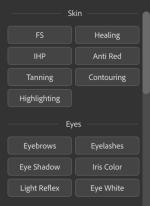
Screen :

What's New
Spoiler contents are visible only to Established Members.
HOMEPAGE
Code:
https://infinite-tools.com/Buy Premium Account From My Download Links & Get Fastest Speed.
You do not have permission to view the full content of this post. Log in or register now.
You do not have permission to view the full content of this post. Log in or register now.
You do not have permission to view the full content of this post. Log in or register now.
You do not have permission to view the full content of this post. Log in or register now.