 PH
PHPHC-ReAl27
Elite
Any advice or suggestions po para mareset sya. Dami ko na nadownload na resetter, at nagawang method based sa youtube pero ganon parin.
Just an add-on of the problem ang Connection Error kasi ay maraming dahilan:Connected and detected naman po ung printer pero ayaw po nya mareset
already tried pohanap ka po ts ng bagong resetter
Will try this later boss, salamat dito
Already tried na po itong 1 at 2, 3 at 4, will try it later, salamat bossJust an add-on of the problem ang Connection Error kasi ay maraming dahilan:
It could be:
1. Sirang USB or faulty USB palitan mo nalang ng cable.
2. Baka naman sa Antivirus. (Disable mo muna Antivirus temporarily)
3. Hindi match ang Printer Driver? I think reinstall printer driver at saka restart printer and Set as default.
4. Maling pag gamit ng resetter. Baka hindi na Run as Administrator. Minsan kasi hindi yan mag function kapag hindi na run as admin.
Yan lang hehe.
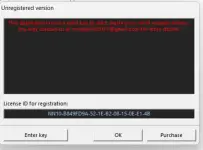 Pano gagawin dito boss?
Click Okay Then Choosed A Command! ...already tried po
Will try this later boss, salamat dito
Already tried na po itong 1 at 2, 3 at 4, will try it later, salamat boss
View attachment 3897523Pano gagawin dito boss?
wala po nagpop-up na commandClick Okay Then Choosed A Command! ...
also, disabled the antivirus and windows defender, dapat fresh install mo ung installation package ng printer mo, and dapat run as admn ung adj program. salamat sa mga suggestions nyoOk na mga boss, inupdate ko driver ng printer at nilipat lipat ko ung USB cable, bigla naman na nareset
ang ginagawa ko jan boss paglumabas yang error off ko muna printer then on ko ulit tapos click ko ulit yung initializeOk na mga boss, inupdate ko driver ng printer at nilipat lipat ko ung USB cable, bigla naman na nareset
also, disabled the antivirus and windows defender, dapat fresh install mo ung installation package ng printer mo, and dapat run as admn ung adj program. salamat sa mga suggestions nyo