Error Webpage upon clicking forgot password

Loydie26

Honorary Poster
Good Day ka-PHC.
Need help about sa pag upload ng system for capstone. Eto lagi lumalabas once na pinindot ko yung forgot password.
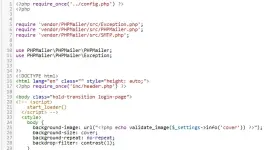

Warning: require(vendor/PHPMailer/src/Exception.php): Failed to open stream: No such file or directory in /srv/disk28/4678926/www/epsims.atwebpages.com/cscs/admin/forgot.php on line 5

Fatal error
: Uncaught Error: Failed opening required 'vendor/PHPMailer/src/Exception.php' (include_path='.:/usr/local/php-8.3.25/share/pear') in /srv/disk28/4678926/www/epsims.atwebpages.com/cscs/admin/forgot.php:5 Stack trace: #0 {main} thrown in /srv/disk28/4678926/www/epsims.atwebpages.com/cscs/admin/forgot.php on line 5


1757735371064.webp
 
Your error message and code snippet indicate that the file vendor/PHPMailer/src/Exception.php is missing from your server. This is causing the require statement to fail and PHP to throw a fatal error. Here’s how you can fix it:

What’s Happening?

  • Your code is trying to include PHPMailer files from the vendor/PHPMailer/src/ directory.
  • The file Exception.php (and likely others in the vendor/PHPMailer/ directory) does not exist or is not in the expected path.
  • This usually happens if you haven’t installed PHPMailer via Composer or manual installation, or if files were accidentally deleted.

How to Fix

1. Install PHPMailer via Composer (Recommended)

If you have access to your server’s terminal and Composer is installed, run:
bash
Code:
composer require phpmailer/phpmailer
This will create a vendor/ directory with all PHPMailer files.

2. Manual Installation

If you can’t use Composer:
  • Download PHPMailer: Go to You do not have permission to view the full content of this post. Log in or register now. and download the latest release as a ZIP.
  • Extract: Upload the src folder to vendor/PHPMailer/ on your server, so you have:
    Code
    Code:
    vendor/PHPMailer/src/Exception.php
    vendor/PHPMailer/src/PHPMailer.php
    vendor/PHPMailer/src/SMTP.php
  • Check Paths: Make sure the folders and filenames match exactly.

3. Check Your Paths

Your require statements must match the actual file structure on your server. For example:
PHP
Code:
[COLOR=rgb(207, 34, 46)]require[/COLOR] [COLOR=rgb(10, 48, 105)]'vendor/PHPMailer/src/Exception.php'[/COLOR];
[COLOR=rgb(207, 34, 46)]require[/COLOR] [COLOR=rgb(10, 48, 105)]'vendor/PHPMailer/src/PHPMailer.php'[/COLOR];
[COLOR=rgb(207, 34, 46)]require[/COLOR] [COLOR=rgb(10, 48, 105)]'vendor/PHPMailer/src/SMTP.php'[/COLOR];
If your project root is different, adjust the path accordingly.

Summary Table

ErrorCauseSolution
File not foundPHPMailer files missingInstall via Composer or manually
Wrong path in requireFolder/file misplacedCheck and fix path

Once you install or upload the missing files, the error should disappear.
Let me know if you need step-by-step help with Composer or manual upload! maybe this can help
 

About this Thread

  • 1
    Replies
  • 182
    Views
  • 2
    Participants
Last reply from:
PHC_HARLEY QUINN

Trending Topics

Online now

Members online
683
Guests online
2,216
Total visitors
2,899

Forum statistics

Threads
2,269,377
Posts
28,928,410
Members
1,242,364
Latest member
bobmarley27
Back
Top