PH
PHGood day.
Dahil sa dami ng information na nakalap ko site na to, nais ko din sana magshare ng konting info na nakalap ko kung saan saan. Para sa mga maraming kapitbahay pero sila lang ang walang WiFi.
I. Download any WiFi managing app. Marami nyan sa Play Store.
II. Search for pristine WiFi networks. Yung halatang hindi pa naeedit. Sundin ang mga susunod na steps for each network:
A. PLDTHOMEDSL, PLDTMyDSL, PLDTMyBiz - Common knowledge na to.
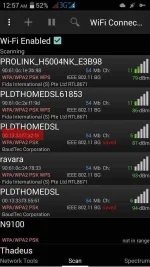
Step 1. Look for the MAC Address. *see highlighted area on attached image"
Step 2. Kunin mo yung last 5 characters, excluding ":".
Step 3. Type in as password: PLDTWIFI"LAST 5 CHARS."
Step 4. Kung hindi gumana in ALL CAPS try lower case.
B. HomeBro_Ultera
Step 1. Look for the MAC Address.
Step 2. Kunin mo yung last 6 characters, excluding ":". Pero this time, -1 sa value ng nasa dulo. Eg. 5➡4, B➡A.
Step 3. Type in as password: HomeBro_"Last 5 characters, ALLCAPS"
C. PROLINK_
Step 1. Look for the MAC Address.
Step 2. Get the last 6 characters excluding ":".
Step 3. Type in as password: "Last 6 characters, ALLCAPS". Lagyan ng WIFI sa gitna. Eg. "123WIFI456".
D. TP_LINK - Di ko pa naconfirm kung gumagana pero try lang. Dito ko sya nakita. http://häçkaday.com/2016/01/27/tp-links-wifi-defaults-to-worst-unique-passwords-ever/
Step 1. Look for the MAC Address.
Step 2. Type in as password: "Last 8 characters, ALL CAPS"
That's all. Sana nakatulong.
Dahil sa dami ng information na nakalap ko site na to, nais ko din sana magshare ng konting info na nakalap ko kung saan saan. Para sa mga maraming kapitbahay pero sila lang ang walang WiFi.
I. Download any WiFi managing app. Marami nyan sa Play Store.
II. Search for pristine WiFi networks. Yung halatang hindi pa naeedit. Sundin ang mga susunod na steps for each network:
A. PLDTHOMEDSL, PLDTMyDSL, PLDTMyBiz - Common knowledge na to.
Step 1. Look for the MAC Address. *see highlighted area on attached image"
Step 2. Kunin mo yung last 5 characters, excluding ":".
Step 3. Type in as password: PLDTWIFI"LAST 5 CHARS."
Step 4. Kung hindi gumana in ALL CAPS try lower case.
B. HomeBro_Ultera
Step 1. Look for the MAC Address.
Step 2. Kunin mo yung last 6 characters, excluding ":". Pero this time, -1 sa value ng nasa dulo. Eg. 5➡4, B➡A.
Step 3. Type in as password: HomeBro_"Last 5 characters, ALLCAPS"
C. PROLINK_
Step 1. Look for the MAC Address.
Step 2. Get the last 6 characters excluding ":".
Step 3. Type in as password: "Last 6 characters, ALLCAPS". Lagyan ng WIFI sa gitna. Eg. "123WIFI456".
D. TP_LINK - Di ko pa naconfirm kung gumagana pero try lang. Dito ko sya nakita. http://häçkaday.com/2016/01/27/tp-links-wifi-defaults-to-worst-unique-passwords-ever/
Step 1. Look for the MAC Address.
Step 2. Type in as password: "Last 8 characters, ALL CAPS"
That's all. Sana nakatulong.