 PH
PHArissa ofuma
Contributor
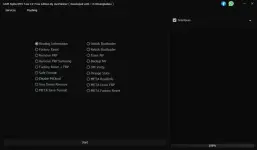
The GSM Alpha MTK Tool C# Free Edition by UunFlasher has some great features. Its user-friendly interface makes it easy to move around and find what you need with clear labels for every option. Best of all, it’s free to use, unlike many ρáíd tools out there. It works with MTK devices, supporting a wide range of smartphones and tablets. Plus, it offers advanced features like removing FRP, flashing software, and fixing DM Verity issues, making it a complete solution for MTK users.
GSM Alpha MTK Tool Features
Services Section
- Reading Information: Retrieve essential device details.
- Factory Reset & FRP Removal: Wipe the device and remove Factory Reset Protection (FRP) locks.
- Safe Format & MiCloud Disable: Ensure safe formatting and disable Xiaomi MiCloud.
- Vivo Demo Remove & META Mode Operations: Remove demo restrictions on Vivo devices and perform various META mode operations.
- Bootloader Unlocking/Relocking: Manage the bootloader of MTK devices.
- DM Verity Fix: Resolve integrity verification issues in Fastboot mode.
Flashing Section
- Loading Firmware via Scatter File: Users can double-click to load firmware files easily.
- Flashing Process Control: The tool enables users to format all partitions or repartition before flashing.
- Boot Device & Reboot Options: After flashing, users can reboot their devices directly from the tool.
Why Choose GSM Alpha MTK Tool?
User-Friendly InterfaceFree to Use
Support for Multiple MTK Devices
Advanced Functions
You do not have permission to view the full content of this post. Log in or register now.
 File Password: 2025