 PH
PHArissa ofuma
Contributor
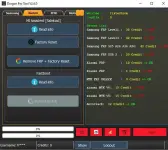
Dragon FRP Tool V2.6.0 is a helpful program for Windows. It supports Samsung, Xiaomi, and MTK devices. You can use it to remove FRP, do a factory reset, and read device info. The best part? Login is bypassed, so you can enter any username and password to open the tool and use some features.
Just note: Server-based features still need credits.
Dragon FRP Tool V2.6.0 Features
General Features
• Tabbed interface: Samsung, Xiaomi, MTK, History, AboutYou do not have permission to view the full content of this post. Log in or register now.
 File Password: 2025
• User info panel: Username, Credits, Show, Logout
• Progress bars for task status
• Control buttons: Screenshot, Flash, Stop Process
• Server info display
Samsung Tab
• Read device info via MTP• Check support for specific models
• FRP removal by IMEI, Serial Number, or USB Server
• Service types: Normal Level 1, Level 3 KG Lock, S25–A56–A36–A26
Xiaomi Tab
• MI Assistant (Sideload): Read Info, Factory Reset• Fastboot: Read Info, Reboot to EDL
• FRP + Factory Reset (disabled)
MTK Tab
• Auth Preloader (enabled by default)• Force SW_CRYPT (optional)
• Brand selection: AUTO, OPPO, VIVO, REDMI, TCL, Samsung, MOTO, INFINIX, HONOR, CUSTOM
• FRP removal via Preloader or BROM
• Version selection: AUTO_v5
Dragon FRP Tool V2.6.0 Download Link
You do not have permission to view the full content of this post. Log in or register now.Watch Video For Installation Procsess
You do not have permission to view the full content of this post. Log in or register now.