PH
PHArissa ofuma
Contributor
How to disable Windows Defender in Windows 10?
For what need to disable Windows Defender?
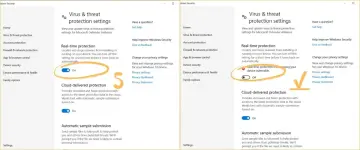
Once you complete the steps, the antivirus will disable the real-time protection, which it’ll allow you to install apps or make a specific system change that you couldn’t before because the security feature was blocking the action. It is needed for unzip and install ac†ïvâ†ør for activate your Windows or Office.Disable Windows Defender in Windows 10
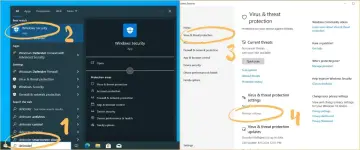
- Open Search.
- Search for defender (1) and click the top result to open the app (2).
- Click on “Virus & threat protection” (3).
- Under the “Virus & threat protection settings” section, click the Manage settings (4) option.
Turn off (5) the “Real-time protection” toggle switch.