PH
PHrainych_ran
Contributor
Complete Recent Diskcord Quest
Note : This does not works in browser for quests which require you to play a game! Use the desktop app to complete those.
How to use this script:
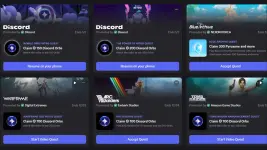
- Accept a quest under the Quests tab
- Press Ctrl+Shift+I to open DevTools
- Go to the Console tab
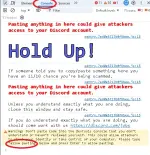
- Paste the following code and hit enter:
- (If you're unable to paste into the console, you might have to type allow pasting and hit enter)
Scripts for this trick : If won't work i'll provide file text.
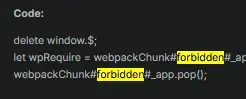
delete window.$;
let wpRequire = webpackChunk#forbidden#_app.push([[Symbol()], {}, r => r]);
webpackChunk#forbidden#_app.pop();
let ApplicationStreamingStore = Object.values(wpRequire.c).find(x => x?.exports?.A?.proto?.getStreamerActiveStreamMetadata).exports.A;
let RunningGameStore = Object.values(wpRequire.c).find(x => x?.exports?.Ay?.getRunningGames).exports.Ay;
let QuestsStore = Object.values(wpRequire.c).find(x => x?.exports?.A?.proto?.getQuest).exports.A;
let ChannelStore = Object.values(wpRequire.c).find(x => x?.exports?.A?.proto?.getAllThreadsForParent).exports.A;
let GuildChannelStore = Object.values(wpRequire.c).find(x => x?.exports?.Ay?.getSFWDefaultChannel).exports.Ay;
let FluxDispatcher = Object.values(wpRequire.c).find(x => x?.exports?.h?.proto?.flushWaitQueue).exports.h;
let api = Object.values(wpRequire.c).find(x => x?.exports?.Bo?.get).exports.Bo;
const supportedTasks = ["WATCH_VIDEO", "PLAY_ON_DESKTOP", "STREAM_ON_DESKTOP", "PLAY_ACTIVITY", "WATCH_VIDEO_ON_MOBILE"]
let quests = [...QuestsStore.quests.values()].filter(x => x.userStatus?.enrolledAt && !x.userStatus?.completedAt && new Date(x.config.expiresAt).getTime() > Date.now() && supportedTasks.find(y => Object.keys((x.config.taskConfig ?? x.config.taskConfigV2).tasks).includes))
let isApp = typeof #forbidden#Native !== "undefined"
if(quests.length === 0) {
console.log("You don't have any uncompleted quests!")
} else {
let doJob = function() {
const quest = quests.pop()
if(!quest) return
const pid = Math.floor(Math.random() * 30000) + 1000
const applicationId = quest.config.application.id
const applicationName = quest.config.application.name
const questName = quest.config.messages.questName
const taskConfig = quest.config.taskConfig ?? quest.config.taskConfigV2
const taskName = supportedTasks.find(x => taskConfig.tasks[x] != null)
const secondsNeeded = taskConfig.tasks[taskName].target
let secondsDone = quest.userStatus?.progress?.[taskName]?.value ?? 0
if(taskName === "WATCH_VIDEO" || taskName === "WATCH_VIDEO_ON_MOBILE") {
const maxFuture = 10, speed = 7, interval = 1
const enrolledAt = new Date(quest.userStatus.enrolledAt).getTime()
let completed = false
let fn = async () => {
while(true) {
const maxAllowed = Math.floor((Date.now() - enrolledAt)/1000) + maxFuture
const diff = maxAllowed - secondsDone
const timestamp = secondsDone + speed
if(diff >= speed) {
const res = await api.post({url:/quests/${quest.id}/video-progress, body: {timestamp: Math.min(secondsNeeded, timestamp + Math.random())}})
completed = res.body.completed_at != null
secondsDone = Math.min(secondsNeeded, timestamp)
}
if(timestamp >= secondsNeeded) {
break
}
await new Promise(resolve => setTimeout(resolve, interval * 1000))
}
if(!completed) {
await api.post({url:/quests/${quest.id}/video-progress, body: {timestamp: secondsNeeded}})
}
console.log("Quest completed!")
doJob()
}
fn()
console.log(Spoofing video for ${questName}.)
} else if(taskName === "PLAY_ON_DESKTOP") {
if(!isApp) {
console.log("This no longer works in browser for non-video quests. Use the #forbidden# desktop app to complete the", questName, "quest!")
} else {
api.get({url:/applications/public?application_ids=${applicationId}}).then(res => {
const appData = res.body[0]
const exeName = appData.executables?.find(x => x.os === "win32")?.name?.replace(">","") ?? appData.name.replace(/[\/\\:*?"<>|]/g, "")
const fakeGame = {
cmdLine:C:\\Program Files\\${appData.name}\\${exeName},
exeName,
exePath:c:/program files/${appData.name.toLowerCase()}/${exeName},
hidden: false,
isLauncher: false,
id: applicationId,
name: appData.name,
pid: pid,
pidPath: [pid],
processName: appData.name,
start: Date.now(),
}
const realGames = RunningGameStore.getRunningGames()
const fakeGames = [fakeGame]
const realGetRunningGames = RunningGameStore.getRunningGames
const realGetGameForPID = RunningGameStore.getGameForPID
RunningGameStore.getRunningGames = () => fakeGames
RunningGameStore.getGameForPID = (pid) => fakeGames.find(x => x.pid === pid)
FluxDispatcher.dispatch({type: "RUNNING_GAMES_CHANGE", removed: realGames, added: [fakeGame], games: fakeGames})
let fn = data => {
let progress = quest.config.configVersion === 1 ? data.userStatus.streamProgressSeconds : Math.floor(data.userStatus.progress.PLAY_ON_DESKTOP.value)
console.log(Quest progress: ${progress}/${secondsNeeded})
if(progress >= secondsNeeded) {
console.log("Quest completed!")
RunningGameStore.getRunningGames = realGetRunningGames
RunningGameStore.getGameForPID = realGetGameForPID
FluxDispatcher.dispatch({type: "RUNNING_GAMES_CHANGE", removed: [fakeGame], added: [], games: []})
FluxDispatcher.unsubscribe("QUESTS_SEND_HEARTBEAT_SUCCESS", fn)
doJob()
}
}
FluxDispatcher.subscribe("QUESTS_SEND_HEARTBEAT_SUCCESS", fn)
console.log(Spoofed your game to ${applicationName}. Wait for ${Math.ceil((secondsNeeded - secondsDone) / 60)} more minutes.)
})
}
} else if(taskName === "STREAM_ON_DESKTOP") {
if(!isApp) {
console.log("This no longer works in browser for non-video quests. Use the #forbidden# desktop app to complete the", questName, "quest!")
} else {
let realFunc = ApplicationStreamingStore.getStreamerActiveStreamMetadata
ApplicationStreamingStore.getStreamerActiveStreamMetadata = () => ({
id: applicationId,
pid,
sourceName: null
})
let fn = data => {
let progress = quest.config.configVersion === 1 ? data.userStatus.streamProgressSeconds : Math.floor(data.userStatus.progress.STREAM_ON_DESKTOP.value)
console.log(Quest progress: ${progress}/${secondsNeeded})
if(progress >= secondsNeeded) {
console.log("Quest completed!")
ApplicationStreamingStore.getStreamerActiveStreamMetadata = realFunc
FluxDispatcher.unsubscribe("QUESTS_SEND_HEARTBEAT_SUCCESS", fn)
doJob()
}
}
FluxDispatcher.subscribe("QUESTS_SEND_HEARTBEAT_SUCCESS", fn)
console.log(Spoofed your stream to ${applicationName}. Stream any window in vc for ${Math.ceil((secondsNeeded - secondsDone) / 60)} more minutes.)
console.log("Remember that you need at least 1 other person to be in the vc!")
}
} else if(taskName === "PLAY_ACTIVITY") {
const channelId = ChannelStore.getSortedPrivateChannels()[0]?.id ?? Object.values(GuildChannelStore.getAllGuilds()).find(x => x != null && x.VOCAL.length > 0).VOCAL[0].channel.id
const streamKey =call:${channelId}:1
let fn = async () => {
console.log("Completing quest", questName, "-", quest.config.messages.questName)
while(true) {
const res = await api.post({url:/quests/${quest.id}/heartbeat, body: {stream_key: streamKey, terminal: false}})
const progress = res.body.progress.PLAY_ACTIVITY.value
console.log(Quest progress: ${progress}/${secondsNeeded})
await new Promise(resolve => setTimeout(resolve, 20 * 1000))
if(progress >= secondsNeeded) {
await api.post({url:/quests/${quest.id}/heartbeat, body: {stream_key: streamKey, terminal: true}})
break
}
}
console.log("Quest completed!")
doJob()
}
fn()
}
}
doJob()
}
- Follow the printed instructions depending on what type of quest you have
- If your quest says to "play" the game or watch a video, you can just wait and do nothing
- If your quest says to "stream" the game, join a vc with a friend or alt and stream any window
- Wait a bit for it to complete the quest
- You can now claim the reward!
 Original app won't allowed you to open the Dev tools or should i say inspect element so download this file.
Download
Script naka txt file!Download
Make sure leave a comment kung hindi gumana para ma update natin yung scripts

 Caution
As of April 7th 2026, #forbidden# has E×ρréššed their intent to crack down on automating quest completion.Some users have received the following system message:
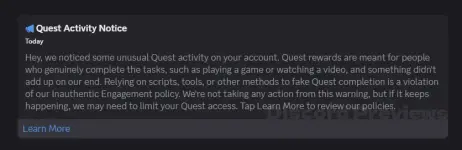
Owner of the scripts said : There isn't much I can do to make the script undetected, so use it at your own risk, as you most likely WILL get flagged by doing so.
Extension Trick : https://phcorner.org/threads/2539052/#post-31535553