 PH
PHArissa ofuma
Contributor
Microsoft Office Professional Plus 2019
Download the program with the following download link| LANGUAGE | 32 BITS | 64 BITS |
| DEUTSCH | You do not have permission to view the full content of this post. Log in or register now. | You do not have permission to view the full content of this post. Log in or register now. |
| ENGLISH | You do not have permission to view the full content of this post. Log in or register now. | You do not have permission to view the full content of this post. Log in or register now. |
| FRANÇAIS | You do not have permission to view the full content of this post. Log in or register now. | You do not have permission to view the full content of this post. Log in or register now. |
| ITALIANO | You do not have permission to view the full content of this post. Log in or register now. | You do not have permission to view the full content of this post. Log in or register now. |
| ESPAÑOL | You do not have permission to view the full content of this post. Log in or register now. | You do not have permission to view the full content of this post. Log in or register now. |
| NEERLANDES | - | You do not have permission to view the full content of this post. Log in or register now. |
| SVERIGE | - | You do not have permission to view the full content of this post. Log in or register now. |
This EXE file is the basis for the installation of the product.
- Once the download is complete, follow these steps:
Right-click the file and select "Run as administrator."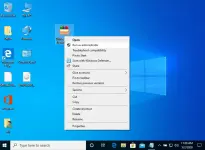
- Click the “Install” button to unzip the application and begin the installation of your product.
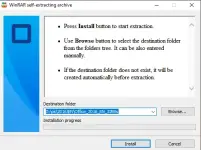
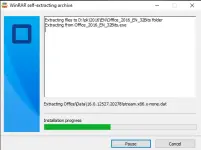
- After the download and installation are complete, open any Microsoft Office application, and you will be prompted to enter the activation key as the first step.
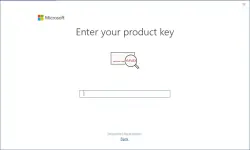
When installing Microsoft Office, you should have been prompted to enter the product key we provided. If this didn't occur, open Word, click on File, then Account, and enter the key there. If you don't activate it, your purchased Microsoft Office will revert to a trial version after 30 days.