PH
PH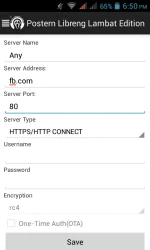
 Step 1. Download nyo muna yung postern. You do not have permission to view the full content of this post.
Log in or register now.
Step 1. Download nyo muna yung postern. You do not have permission to view the full content of this post.
Log in or register now.Step 2. Open nyo yung postern, click nyo yung 3lines sa left side sa taas ng postern.
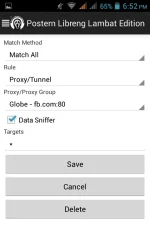
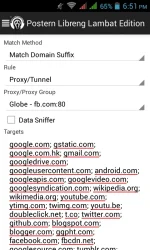
Step 3. Click nyo yung proxy, tpos delete nyo yung default tpos gawa kayo ng bago.. Gayahin nyo lng screenshots. Globe yan kaya palitan nyo lng yung proxy kung anong network gamit nyo.
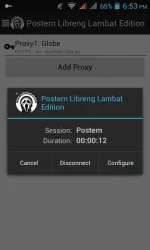
Step 4. Click vpn on. Connected ka na!!
Sana ma gets nyo. Haha