 PH
PHFallen1001
Forum Veteran
Idk if may tutorial naba nito dito pero share ko pa rin for those who want to try this
Before I start I'll explain first bakit ko naisipan gawin to. So last month nasira yung module ng R291 ko so hindi na gumagana kapag sinalpakan ng sim card (nabura na kase IMEI). Then I bought openline Fx-id7, pero nakukulangan ako sa performance since mas basic lang sya compared sa R291. Walang QoS, walang Vpn features directly sa router and other things. But since I used it as extender and sa R291 pa rin ako kumoconnect, nagagamit ko pa rin yung mga features na yun na wala sa Fx-id7.
To make it simple, si Fx-id7 lang ang nagpoprovide ng internet pero sa R291 pa rin ako kumoconnect.
Mga gamit ko:
Router A: FX-ID7 (may SIM, working, main internet)
Router B: Boosteven R291 (sirang module, pero WiFi still working and other features)
1 LAN cable
Optional: laptop or phone to access router settings
Goal:
Gamitin si Router B para lumawak ang WiFi signal ni Router A gamit lang LAN cable (walang SIM si Router B) at magamit pa rin ang features ni Router B na wala kay Router A.
 Step-by-Step Tutorial (LAN to LAN setup)
 STEP 1: I-reset muna si Router B
Hanapin yung reset button (usually butas sa likod)
Tusukin gamit ng pin/ballpen, hold ng 10-15 seconds
Hintayin mag-reboot. Back to default settings na yan.
STEP 2: I-connect ang phone/laptop sa Router B
Connect via WiFi o LAN cable
Sa browser, i-type yung IP address ni Router B:
Usually 192.168.1.1, 192.168.0.1, or 192.168.8.1
(Check sa ilalim ng router kung may naka-sticker)
STEP 3: Palitan ang IP address ni Router B
Hanapin ang LAN Settings
Palitan yung IP, gawin mo 192.168.1.2 (dapat same range kay Router A, in this case 192.168.1.1 kay Router A)
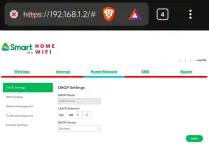
Save and reboot if needed
STEP 4: I-disable ang DHCP ni Router B
Punta sa DHCP Settings
I-turn off para si Router A lang magbigay ng IP sa devices
Save ulit
STEP 5: I-connect si Router A at B gamit LAN cable
LAN port ng Router A → LAN port ng Router B
Wag gamitin ang WAN port ni Router B
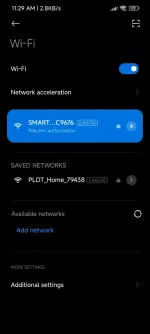
STEP 6: Ayusin ang WiFi settings (optional)
Pwede mo:
Gayahin ang WiFi name at password ni Router A (for seamless connection)
O ibang SSID para alam mo kung saan ka nakakonekta
Tip: Gumamit ng ibang WiFi channel para iwas sagabal
(Channel 1 kay Router A, Channel 6 or 11 kay Router B)
---
 Done! Gumagana na dapat
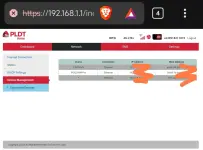
Pwede ka nang kumonekta sa WiFi ni Router B at makakakuha ka ng internet galing kay Router A. Perfect to kung malayo ka sa main router at gusto mo ng mas malakas na signal and if gusto mo magamit pa rin ang features ni Router B na wala kay Router A
Hope makatulong 'to sa mga may extra router d'yan na sira ang module pero ayaw itapon
Comment na lang kayo ku
ng may tanong, sasagutin ko as much as I can.
Before I start I'll explain first bakit ko naisipan gawin to. So last month nasira yung module ng R291 ko so hindi na gumagana kapag sinalpakan ng sim card (nabura na kase IMEI). Then I bought openline Fx-id7, pero nakukulangan ako sa performance since mas basic lang sya compared sa R291. Walang QoS, walang Vpn features directly sa router and other things. But since I used it as extender and sa R291 pa rin ako kumoconnect, nagagamit ko pa rin yung mga features na yun na wala sa Fx-id7.
To make it simple, si Fx-id7 lang ang nagpoprovide ng internet pero sa R291 pa rin ako kumoconnect.
Mga gamit ko:
Router A: FX-ID7 (may SIM, working, main internet)
Router B: Boosteven R291 (sirang module, pero WiFi still working and other features)
1 LAN cable
Optional: laptop or phone to access router settings
Goal:
Gamitin si Router B para lumawak ang WiFi signal ni Router A gamit lang LAN cable (walang SIM si Router B) at magamit pa rin ang features ni Router B na wala kay Router A.
Step-by-Step Tutorial (LAN to LAN setup) STEP 1: I-reset muna si Router BHanapin yung reset button (usually butas sa likod)
Tusukin gamit ng pin/ballpen, hold ng 10-15 seconds
Hintayin mag-reboot. Back to default settings na yan.
STEP 2: I-connect ang phone/laptop sa Router BConnect via WiFi o LAN cable
Sa browser, i-type yung IP address ni Router B:
Usually 192.168.1.1, 192.168.0.1, or 192.168.8.1
(Check sa ilalim ng router kung may naka-sticker)
STEP 3: Palitan ang IP address ni Router BHanapin ang LAN Settings
Palitan yung IP, gawin mo 192.168.1.2 (dapat same range kay Router A, in this case 192.168.1.1 kay Router A)
Save and reboot if needed
STEP 4: I-disable ang DHCP ni Router BPunta sa DHCP Settings
I-turn off para si Router A lang magbigay ng IP sa devices
Save ulit
STEP 5: I-connect si Router A at B gamit LAN cableLAN port ng Router A → LAN port ng Router B
Wag gamitin ang WAN port ni Router B
STEP 6: Ayusin ang WiFi settings (optional)Pwede mo:
Gayahin ang WiFi name at password ni Router A (for seamless connection)
O ibang SSID para alam mo kung saan ka nakakonekta
Tip: Gumamit ng ibang WiFi channel para iwas sagabal
(Channel 1 kay Router A, Channel 6 or 11 kay Router B)
---
Done! Gumagana na dapatPwede ka nang kumonekta sa WiFi ni Router B at makakakuha ka ng internet galing kay Router A. Perfect to kung malayo ka sa main router at gusto mo ng mas malakas na signal and if gusto mo magamit pa rin ang features ni Router B na wala kay Router A
Hope makatulong 'to sa mga may extra router d'yan na sira ang module pero ayaw itapon
Comment na lang kayo ku
ng may tanong, sasagutin ko as much as I can.