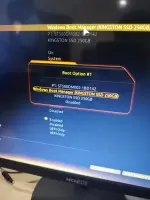
❓ Help Help me ssd and hard disk na read sa bios pero kpag excute na ayaw

Status
Not open for further replies.
Hello, it seems like you are experiencing an issue where your SSD and hard disk are not being detected in the BIOS but still prompt you to insert them. This could be caused by several reasons such as a faulty connection, incompatible hardware, or a misconfiguration in the BIOS settings.

Here are some steps you can try to troubleshoot the issue:

1. Check the connections: Make sure that the SSD and hard disk are properly connected to the motherboard using the SATA cables and power cables. Sometimes a loose connection can prevent the drives from being detected.

2. Check for compatibility: Ensure that the SSD and hard disk are compatible with your motherboard. Some older motherboards may not support newer storage devices or require a BIOS update to detect them.

3. BIOS settings: Enter the BIOS settings and check if the SATA ports are enabled. Sometimes the ports are disabled by default, which can prevent the drives from being detected. Also, check the boot order to ensure that the SSD or hard disk is set as the primary boot device.

4. Reset BIOS settings: If you are unsure about the BIOS settings, you can try resetting the BIOS to its default settings. This can sometimes resolve detection issues.

5. Update BIOS: Check if there is a BIOS update available for your motherboard. Updating the BIOS can sometimes add support for newer hardware and resolve detection issues.

6. Test the drives: If possible, test the SSD and hard disk on another system to see if they are detected. This can help determine if the issue is with the drives themselves or with the motherboard.

If you have tried these steps and are still facing issues, please provide more details about your system configuration, such as the motherboard model, SSD and hard disk models, and any recent changes you have made that could have caused the issue. This information will help in providing more specific troubleshooting steps.
 
Picturan mo bios sa boot options, send mo dito
Wait po

IMG_20250729_091329.webp
 
Status
Not open for further replies.

About this Thread

  • 50
    Replies
  • 1K
    Views
  • 10
    Participants
Last reply from:
Krizza Babies

Trending Topics

Online now

Members online
767
Guests online
1,039
Total visitors
1,806

Forum statistics

Threads
2,271,684
Posts
28,937,308
Members
1,238,781
Latest member
alleysid
Back
Top