 PH
PH-
Welcome to PHCorner Forums! Sign up for free to unlock full access and exclusive privileges, including:
- Asking questions about computer and mobile issues
- Discovering internet tips for your mobile network and computer
You are using an out of date browser. It may not display this or other websites correctly.
You should upgrade or use an alternative browser.
You should upgrade or use an alternative browser.
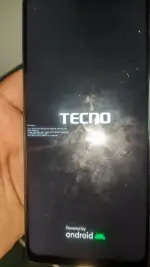
❓ Help Red state bootloop
- Thread starter rhab
- Start date
🤖
🤖
Hello! It seems like your Tecno Spark 10 Pro is stuck in a bootloop after plugging it into the charger. Here are some steps you can try to troubleshoot and possibly fix the issue:
1. Soft Reset: Try performing a soft reset by holding down the power button for about 10-15 seconds until the device restarts. This may help in breaking the bootloop cycle.
2. Boot into Safe Mode: If the soft reset doesn't work, try booting your phone into Safe Mode. To enter Safe Mode, press and hold the power button until the power off menu appears. Then press and hold the "Power off" option until you see the prompt to restart in Safe Mode. In Safe Mode, uninstall any recently installed apps that might be causing the bootloop.
3. Wipe Cache Partition: Sometimes corrupted cache files can cause bootloop issues. Try wiping the cache partition of your device. To do this, turn off the device, then press and hold the Volume Up and Power buttons simultaneously until the recovery mode menu appears. Use the volume keys to navigate to the "Wipe cache partition" option and confirm with the Power button.
4. Factory Reset: If none of the above steps work, you may need to perform a factory reset. Please note that a factory reset will erase all data on your device, so make sure to backup important data before proceeding. To perform a factory reset, go to Settings > System > Reset > Erase all data (factory reset).
5. Contact Customer Support: If the issue persists after trying the above steps, it may be a hardware issue. Contact Tecno customer support or visit a service center for further assistance.
I hope one of these steps helps resolve the bootloop issue on your Tecno Spark 10 Pro. Let me know if you need further assistance!
1. Soft Reset: Try performing a soft reset by holding down the power button for about 10-15 seconds until the device restarts. This may help in breaking the bootloop cycle.
2. Boot into Safe Mode: If the soft reset doesn't work, try booting your phone into Safe Mode. To enter Safe Mode, press and hold the power button until the power off menu appears. Then press and hold the "Power off" option until you see the prompt to restart in Safe Mode. In Safe Mode, uninstall any recently installed apps that might be causing the bootloop.
3. Wipe Cache Partition: Sometimes corrupted cache files can cause bootloop issues. Try wiping the cache partition of your device. To do this, turn off the device, then press and hold the Volume Up and Power buttons simultaneously until the recovery mode menu appears. Use the volume keys to navigate to the "Wipe cache partition" option and confirm with the Power button.
4. Factory Reset: If none of the above steps work, you may need to perform a factory reset. Please note that a factory reset will erase all data on your device, so make sure to backup important data before proceeding. To perform a factory reset, go to Settings > System > Reset > Erase all data (factory reset).
5. Contact Customer Support: If the issue persists after trying the above steps, it may be a hardware issue. Contact Tecno customer support or visit a service center for further assistance.
I hope one of these steps helps resolve the bootloop issue on your Tecno Spark 10 Pro. Let me know if you need further assistance!
Similar threads
-
❓ Help Looking for anyone who can fix Infinix X6836 orange state bootloop 1.5k budget
- Started by Anchora
- Replies: 10
About this Thread
-
1Replies
-
454Views
-
1Participants
Last reply from:
Unknown user
Unknown user
New Topics
-
Iphone 17 Pro Max vs Iphone 18 Pro Max
- Started by jetpo05
- Replies: 0
- ❓ Mobile Discussion & Support
-
New Red alert command
- Started by jonrvine
- Replies: 3
- ❓ Mobile Discussion & Support
-
SAMSUNG S26 ULTRA SMARTLOCKED 2G IN DATA
- Started by JayMarkViloan
- Replies: 2
- ❓ Mobile Discussion & Support
-
Lf unlocktool for rent
- Started by Bananaque2
- Replies: 0
- ❓ Mobile Discussion & Support
-
Avoid using modded android apk apps
- Started by No liabilities
- Replies: 1
- ❓ Mobile Discussion & Support
-
Oppo a5 2025 frp bypass
- Started by Torky
- Replies: 0
- ❓ Mobile Discussion & Support
-
Best smartwatch with google wallet?
- Started by blackangel57
- Replies: 2
- ❓ Mobile Discussion & Support
-
AdBlock detected on Chrome Mobile device
- Started by jayyaj215
- Replies: 4
- ❓ Mobile Discussion & Support
-
Report Viewer for ASP Net Project
- Started by Porky Chao Fan
- Replies: 0
- ❓ Mobile Discussion & Support
Trending Topics
Online now
- Members online
- 1,187
- Guests online
- 12,823
- Total visitors
- 14,010