 PH
PHDownload
Emulators
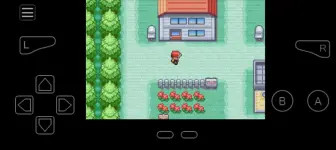
1. You do not have permission to view the full content of this post. Log in or register now.
Download shaders You do not have permission to view the full content of this post. Log in or register now..
* To use shader, open My Boy! then go to Settings>Video>GLSL shader.
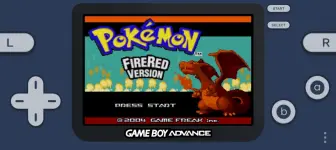
2. You do not have permission to view the full content of this post. Log in or register now.
Skins: You do not have permission to view the full content of this post. Log in or register now., You do not have permission to view the full content of this post. Log in or register now. (zip)
* To set skin, go to settings>UI>Full skin>Import from zip. After importing the zip file tap Set full skin and select the desired theme.
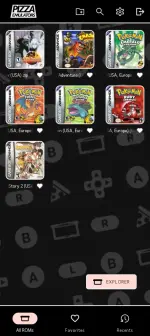
* To change boxart or cover, go to settings>UI. Scroll down and enable Boxart. Now go to Roms Menu, tap and hold any Roms and tap Change Icon. Don't forget to download boxarts You do not have permission to view the full content of this post. Log in or register now..
Boxarts preview:
Emulators
1. You do not have permission to view the full content of this post. Log in or register now.
Download shaders You do not have permission to view the full content of this post. Log in or register now..
* To use shader, open My Boy! then go to Settings>Video>GLSL shader.
2. You do not have permission to view the full content of this post. Log in or register now.
Skins: You do not have permission to view the full content of this post. Log in or register now., You do not have permission to view the full content of this post. Log in or register now. (zip)
* To set skin, go to settings>UI>Full skin>Import from zip. After importing the zip file tap Set full skin and select the desired theme.
* To change boxart or cover, go to settings>UI. Scroll down and enable Boxart. Now go to Roms Menu, tap and hold any Roms and tap Change Icon. Don't forget to download boxarts You do not have permission to view the full content of this post. Log in or register now..
Boxarts preview:

