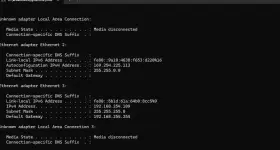
Hello! Yes, you can definitely connect your third router (ZLT S10G) to the second router (Huawei) in your network setup. Here's a general guide on how you can do this:
1. Connect your ZLT S10G router to your Huawei router using an Ethernet cable. You can connect it to any LAN port on the Huawei router.
2. Access the web interface of your ZLT S10G router using a web browser. To do this, you need to know the default IP address of the ZLT S10G router. You can usually find this information in the router's manual or on the manufacturer's website.
3. Once you access the web interface of the ZLT S10G router, you may need to configure its WAN settings. You will need to set the WAN connection type to DHCP if your Huawei router is providing the IP addresses via DHCP. If not, you may need to configure a static IP address for the ZLT S10G router.
4. Make sure that the LAN IP address of the ZLT S10G router is on a different subnet from the Huawei router. For example, if the Huawei router's IP address is 192.168.1.1, you can set the ZLT S10G router's IP address to 192.168.2.1.
5. Configure the wireless settings on the ZLT S10G router if you want to use it as a wireless access point. You can set up the SSID, security settings, and password to match your existing network.
6. Save the settings on the ZLT S10G router and reboot it if necessary. After the reboot, you should be able to connect devices to the ZLT S10G router and access the internet through your main Gfiber connection.
I hope this helps! Let me know if you have any more questions or encounter any issues along the way.
 PH
PH