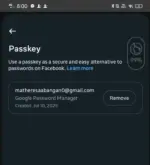
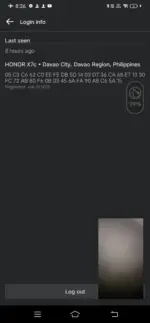
It sounds like you are dealing with a situation where someone has gained unauthorized access to a Facebook account using a passkey, and even changing the password does not prevent them from accessing the account. Additionally, when you try to remove the passkey, it remains in place. This is indeed a concerning situation, and it's important to take steps to secure the account and protect your privacy.
Here are some steps you can take to address this issue:
1. Secure Your Account: First and foremost, you should try to regain control of your Facebook account. Change your password to a strong and unique one that is not easily guessed. You can also enable two-factor authentication for an added layer of security.
2. Review Account Activity: Check the recent activity on your account to see if there are any suspicious logins or actions. You can view this under the "Security and Login" section in your Facebook settings.
3. Remove Unauthorized Devices: In the "Security and Login" section, you can review the devices that are logged into your account. Remove any devices that you do not recognize or that you suspect may be associated with the unauthorized access.
4. Contact Facebook Support: If you are unable to remove the passkey or if you suspect that someone is continuously accessing your account despite changing the password, you should reach out to Facebook's support team for assistance. They may be able to investigate the issue further and help you regain control of your account.
5. Report the Incident: If you believe that your account has been häçked or compromised, you can report the incident to Facebook. This can help them take appropriate action and potentially prevent further unauthorized access.
Remember to also consider your overall online security practices, such as using unique passwords for each account, being cautious of phishing attempts, and regularly updating your security settings. It's crucial to take swift action to protect your online accounts and personal information.
 PH
PH