 PH
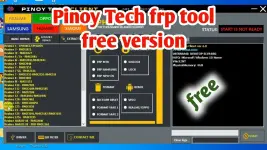
PHIn the realm of mobile phone maintenance and repair, having access to reliable tools is crucial for technicians and enthusiasts alike. Pinoy Tech FRP Unlock Tool & Flash Tool stands out as a versatile solution that combines both FRP unlocking and flashing capabilities, catering primarily to Android devices. Here’s a comprehensive overview of what this tool offers:
Features and Capabilities
FRP Unlocking: The tool supports a wide range of Android devices, enabling technicians to bypass FRP locks efficiently. This feature is particularly useful after a factory reset when the device demands previous Google account credentials.
Flashing Firmware: Technicians can utilize the tool to flash official firmware files onto Android phones. This process is instrumental in resolving software-related issues such as boot loops, system crashes, or sluggish performance.
Compatibility and Ease of Use
- Wide Device Support: Pinoy Tech FRP Unlock Tool & Flash Tool is compatible with various Android smartphone brands and models, ensuring versatility in application.
- User-Friendly Interface: The tool is designed with a straightforward interface, making it accessible even for users with limited technical expertise.
Conclusion
In conclusion, Pinoy Tech FRP Unlock Tool & Flash Tool emerges as a valuable asset in the toolkit of mobile phone repair professionals. Its dual functionality of FRP unlocking and firmware flashing, coupled with ease of use and broad compatibility, makes it a preferred choice for resolving Android device issues effectively.
Pinoy Tech FRP Unlock Tool: You do not have permission to view the full content of this post. Log in or register now. | You do not have permission to view the full content of this post. Log in or register now.
"Warning: Disable your antivirus before installing cracked software, as it may flag the files as malicious."
 nakadipende parin sa security patches ng phone