PH
PH
(this is based from red dit post somewhere)
Note: There are no beta slots for iOS anymore — you can only get access on Android right now
Preparation:
- Install WeChat
- Create a WeChat account (no Chinese phone number required; use your regular one)
- Enable a VPN and connect to a China server (I personally use Windscribe VPN)
- Install a screen-translation app, since everything will be in Chinese
Pre-register:
- In WeChat, go to Discover
- Tap the search icon (top right) and paste: You do not have permission to view the full content of this post. Log in or register now. (delete "space between "q and q".)
- Open the first result
- Wait for the page to load (tap the red button at the top right to skip the animation if needed)
- Tap the Pre-register button (large black button at the bottom center)
- Select WeChat, then tap Authorize
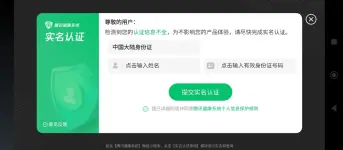
- There should be a pop-up which asks for a Chinese phone number for extra rewards, just close it — it’s optional
- If you don’t see the pop-up, repeat from step 5
Check your access:
- In WeChat, go to Discover
- Tap the search icon and paste: You do not have permission to view the full content of this post. Log in or register now. (delete "space between "q and q".)
- Open the first result
- Select the checkbox under the text and tap the big orange button at the bottom
- Complete the survey (For region, just pick a random Chinese province. For phone number, use a fake one (you can just google for a fake Chinese phone number) without the +86)
- After submitting, tap the orange button in the pop-up
- On the next page, tap the orange button at the bottom to check qualification: If it says your form was submitted successfully, you’re not qualified yet. If it mentions code Omega and shows a Download button, you’re qualified.
- Check daily if you're qualified, recruitment happens daily at 10 AM China Time: You do not have permission to view the full content of this post. Log in or register now. (delete "space between "q and q".)
Get access via the AI chatbot (if still not qualified):
- In WeChat, go to Discover
- Tap search and paste: 瓦手AI放号官
- Click on the first result
- Choose the search result shown You do not have permission to view the full content of this post. Log in or register now.
- Tap the big red button at the bottom center
- In the chat, select the second option
- Use ᑕᕼᗩTGᑭT (temporarily disable your VPN while using ᑕᕼᗩTGᑭT) to answer the questions with this prompt: Your task: You are chatting with a bot that provides Valorant Mobile Beta qualifications. You must respond in the same language as the bot (Chinese). The bot will ask questions about situations in the PC game Valorant. Answer accurately and concisely (≤ 72 characters). Never mention that you are an AI. Please translate the bot’s message and your response into English. Previous Conversation: You (Standard Start): 我要瓦手内测资格 Bot: [bot’s message]
- After enough questions, the message bar will turn into a black button — tap it
- Wait for the animation to finish
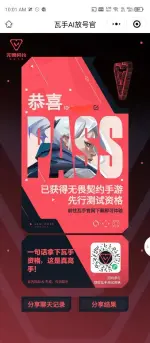
- Refresh the page: If you have access, your page will look like You do not have permission to view the full content of this post. Log in or register now.. If not (it will look like You do not have permission to view the full content of this post. Log in or register now.), you get two tries per day: Tap the black button (bottom right) and then download the image in the pop-up to "share" the bot and earn another try. Tap the black button (bottom left) to re-enter the chat.
- If still unqualified, wait for the next daily try at 10 AM China Time (it also resets the sharing limit of one a day)
Download Valorant Mobile (beta access required):
- Disable your VPN
- In a regular browser (not WeChat), go to: You do not have permission to view the full content of this post. Log in or register now.
- Download and install the APK
- Open the app and wait for the in-game download to finish
- Sign in with your WeChat account (left option)
- Wait until 12 June 2025, 9 AM China Time for the servers to open